

Disclosure: Some of the links on Daily Digital Reviews are affiliate links. This means that if you click on a link and make a purchase, we may earn a small commission — at no extra cost to you.
A New Way to Build Local Business Websites
Brila.ai caught my attention because its approach to website creation is genuinely different from anything else in this category. Instead of asking you to write prompts or fill out templates, it pulls your Google Maps reviews and builds a website from what your actual customers have already said about you. That’s a sharp idea — and worth a closer look.
Most AI website builders still expect you to do the heavy lifting on messaging. You describe your business, pick a template, and hope the AI fills in something useful. Brila flips that. It treats your existing review data as the source of truth, then generates copy around what customers actually value about your business. For local businesses that already have a Google Maps presence, that could be genuinely useful — or it could be a clever concept that falls short in practice. I analyzed the available vendor material, feature documentation, and user reports to find out which it is.
Quick Verdict: Brila.ai is a focused, lightweight AI website builder for local businesses that uses Google Maps reviews as its content source — a genuinely distinct approach. Early user reports are positive about speed and copy quality, but the product is clearly built for one-page local sites and not complex web projects.
Overall Rating: 3.4 / 5 ⭐
Feature depth: 3.0/5 · Ease of use: 4/5 · Pricing value: 3.5/5 · Trust signals: 3/5
What Is Brila.ai?
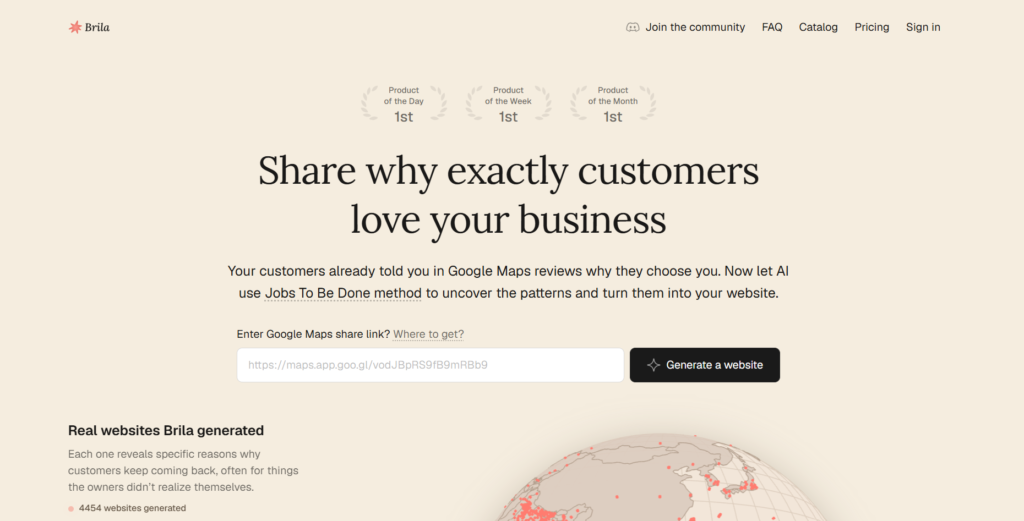
Brila is an AI-powered, no-code website builder built specifically for local businesses. Its core pitch is that it generates a one-page professional website from a business’s Google Maps listing — pulling reviews, ratings, photos, opening hours, and location data rather than asking the owner to write anything from scratch.
The company describes it as a tool for small businesses that need a fast, credibility-focused online presence without hiring a designer or copywriter. It’s aimed squarely at cafes, salons, service providers, shops, and similar location-based businesses that already have a Google Maps presence with enough reviews to give the AI something to work with.
Key Features
Website Generation from Google Maps Reviews
The headline feature is that Brila reads your Google Maps listing — reviews, photos, business details — and generates a fully built one-page site from that data. You paste a link, and the system does the rest. No prompts, no blank-page anxiety.
Jobs to Be Done Framework
This is the part that stands out most on paper. Brila doesn’t just summarize reviews — it applies a Jobs to Be Done approach to infer why customers chose your business. If your reviews repeatedly mention convenience, speed, or a specific specialization, the system is designed to surface those themes and build your site’s messaging around them. Product Hunt’s description says this can surface a business’s perceived value more accurately than generic website copy, and that users are often surprised by the result.
Automated Content and Asset Extraction
The system pulls structured data including business name, images, ratings, opening hours, menu items where relevant, and the language patterns from customer reviews. A video walkthrough confirms the product scrapes this data automatically when you provide a Google Maps link, turning it into site copy and layout without manual input.
No-Code Workflow
The product is designed for non-technical owners. There’s no drag-and-drop editor to learn, no theme customization maze — the site is generated, not assembled. That trades flexibility for speed, which is the right tradeoff for the target audience.
Free Plan with a Usable Site
Brila includes a free plan that generates a fully built site, which lowers the barrier to trying it significantly.
How Brila.ai Works
Step 1: Provide Your Google Maps Link
According to the vendor’s documentation and available walkthroughs, the workflow starts with a shareable Google Maps business link. You paste it in, and the system begins pulling publicly available listing data.
Step 2: AI Analysis and Content Generation
Brila’s AI analyzes the scraped data — especially the reviews — using its Jobs to Be Done framework to identify recurring customer motivations, the specific language customers use, and the themes that explain why people choose the business. This becomes the foundation for the site’s copy.
Step 3: Site Is Built and Delivered
The system generates a one-page website from that analysis, including copy, layout, and visual assets pulled from the listing. The output is described as ready to use, not a rough draft requiring major editing.
What the Evidence Shows
What the Vendor Claims
Brila positions itself as content-first, arguing that the best marketing copy for any local business already exists in what customers have said publicly. Their terms describe the service as generating and editing business websites based on publicly available review and business information — which confirms the approach is genuinely review-driven rather than template-driven.
What Users Report
Available user sentiment is mostly positive, but it comes primarily from Product Hunt launch pages and video walkthroughs rather than large-scale independent review platforms like G2 or Trustpilot. Video reviewers describe the product as fast and surprisingly effective at generating copy that reflects the actual business. Product Hunt coverage highlights that users are impressed by how well the site captures a business’s real value. That’s encouraging, but it’s worth noting that early launch-phase feedback skews positive. There isn’t enough long-term review data here to make strong claims about reliability or support quality.
How It Stacks Up Against the Category
Compared to general AI website builders, Brila’s specialization is both its strength and its ceiling. Tools like Durable or Wix AI can build more complex multi-page sites with broader design options. Brila doesn’t try to compete there — it goes narrow and deep on one use case. For a local business owner who has reviews and wants a fast, credible landing page, that focus is probably an advantage, not a limitation.
Brila.ai vs Competitors
If you’re weighing Brila against other AI builders, here’s how the feature sets compare. You might also want to read our Pagepilot review or our LandCopyAI review for related tools in this space.
| Feature | Brila.ai | Durable | Wix AI Builder |
|---|---|---|---|
| Builds from Google reviews | Yes | No | No |
| Multi-page websites | No (one-page) | Yes | Yes |
| Free plan available | Yes | Yes (limited) | Yes (limited) |
| No-code setup | Yes | Yes | Yes |
| Local business focus | Yes (core focus) | Partial | No |
| Starting paid price | ~$9/month | ~$12/month | ~$17/month |
Pricing
Brila offers a free plan that generates a fully built site from your Google Maps data. A third-party walkthrough video puts the Pro plan at $9 per month, which would make it one of the cheaper paid tiers in the AI website builder category. However, the available sources conflict slightly on what the free plan allows — one source says one website, another says up to two landing pages — and the pricing page returned an error at the time of research. For the exact current tier limits, check Brila directly before committing.
Pros and Cons
Pros
- Uses real customer review language instead of generic AI-generated copy
- Fast website generation — paste a Google Maps link and get a built site
- Jobs to Be Done approach goes deeper than simple review summarization
- Free plan gives you a fully generated site to evaluate before paying
- Very low cost on the Pro plan compared to broader AI website builders
Cons
- Limited to one-page sites — not suitable for complex or multi-page web projects
- Depends heavily on having enough meaningful Google Maps reviews to generate good output
- Pricing details and tier limits are inconsistent across available sources — verify before signing up
Who Should Use Brila.ai?
Brila is a strong fit for local business owners — think cafes, hair salons, plumbers, yoga studios, or any service-based business — who already have a Google Maps listing with real reviews and just need a clean, fast landing page online. It’s also well suited to freelancers or agencies who build simple web presences for local clients and want to cut the content creation time significantly.
If you need a multi-page website, an e-commerce store, a custom brand design system, or you’re building a SaaS or content site, Brila isn’t the right tool. It’s also a weaker choice if your business is brand new with no Google reviews yet, since the AI’s output quality depends directly on the review data it has to work with. For those situations, you’re better served by a more general AI builder. Our Loova review covers one alternative worth considering
Frequently Asked Questions
Does Brila.ai work without any Google Maps reviews?
The product is built around pulling review data to generate copy, so having at least some reviews is important. Based on available documentation, businesses with very few or no reviews may get a much thinner output. The tool is most effective when there’s enough review content for the AI to identify patterns and themes.
Is there a free plan, and what does it include?
Yes, Brila offers a free plan that generates a fully built site. Available sources suggest it covers at least one website, though the exact limits vary across different descriptions. Check the pricing page directly for the current free tier allowance before relying on third-party information.
What kind of website does Brila generate?
Brila generates a one-page website. It’s designed for speed and clarity — a professional landing page that communicates what the business does and why customers choose it, rather than a deep multi-page web presence.
How is Brila different from tools like Durable or Wix AI?
The core difference is the input source. Durable and Wix AI ask you to describe your business. Brila reads your Google Maps reviews and builds the site from what your customers have already said. That can produce more authentic copy for local businesses, at the cost of design flexibility and scope.
Final Verdict
Brila has a genuinely smart idea at its core. Using customer review language as the source of website copy is more strategically sound than asking a business owner to write prompts, and the Jobs to Be Done angle makes it more than a simple scraping tool. For local businesses with an established Google Maps presence, it offers a fast, low-effort path to a credible landing page.
The limitations are real, though. It’s a one-page tool, not a full website builder. The pricing details need verification. And early-stage user feedback, while positive, doesn’t yet represent broad long-term usage. If you’re a local business owner who needs a quick, credibility-driven page and doesn’t want to spend hours on copy, Brila is worth trying on the free plan. If you need more than one page or more design control, look elsewhere.
Review Methodology
This review is based on analysis of Brila’s vendor documentation, pricing pages, and feature set, combined with user reports and product descriptions gathered from Product Hunt, video walkthroughs, and third-party product coverage published at the time of research.