Disclosure: Some of the links on Daily Digital Reviews are affiliate links. This means that if you click on a link and make a purchase, we may earn a small commission — at no extra cost to you.
The Problem Every Multi-Platform Creator Knows Too Well
The RepurposeAI Review searches circulating online almost always point to the same product: Repurpose.io, a workflow-based content distribution platform aimed at creators who are tired of manually reformatting and uploading the same content everywhere. If you’ve ever recorded a podcast episode, then spent an hour downloading it, clipping it, resizing it, captioning it, and uploading it separately to YouTube Shorts, TikTok, Instagram Reels, and LinkedIn — you already understand the exact pain this tool targets. The pitch is simple: set up a workflow once, and let the platform handle the repetitive distribution work automatically. That’s either genuinely useful or a solution in search of a problem, depending entirely on your content volume and workflow. I analyzed the vendor’s documentation, pricing pages, and user reports across multiple platforms to give you an honest take.
⚡ Quick Verdict: Repurpose.io is a solid automation tool for creators who already produce content at volume and want it distributed across multiple platforms without the manual grind. It’s not an AI content generator or a clip editor — it’s a distribution layer. If you need editing, clipping, or analytics, you’ll need to pair it with something else.
Overall Rating: 3.5 / 5 ⭐
Feature depth: 3/5 · Ease of use: 4/5 · Pricing value: 3.5/5 · Trust signals: 4/5
What Is Repurpose.io?
Repurpose.io is a content repurposing and social media automation platform. The product sits in a category best described as syndication automation — it doesn’t write content, generate scripts, or find viral moments in your footage. What it does is watch a source channel (your podcast feed, YouTube account, Dropbox folder, TikTok profile, and more), apply workflow rules you define, and push that content to destination platforms like Instagram, Facebook, LinkedIn, YouTube Shorts, TikTok, Pinterest, Snapchat, and X.
The target users are podcasters, YouTubers, coaches, agencies, and solo creators who already have a content library and want to multiply its reach without multiplying their workload. The company describes itself as the “#1 content repurposing platform” on its pricing page, though that’s their own self-positioning. What’s independently verifiable is that the product has been around long enough to accumulate a recognizable user base and a consistent set of reviews across multiple platforms, which does signal real market traction.
It’s worth being clear: “RepurposeAI” isn’t a distinct product. The “AI” label appears to be a common shorthand or misspelling used by searchers, but the actual platform at repurpose.io is workflow-driven automation, not an AI-first creative tool.
Key Features
Automated Cross-Posting to Multiple Platforms
The core feature is automated publishing across a wide range of social networks. Once you connect your accounts and configure a workflow, the platform monitors your source content and distributes it to each connected destination automatically. The supported platform list includes Instagram, TikTok, YouTube Shorts, Facebook, LinkedIn, Pinterest, Snapchat, X (Twitter), and others according to the pricing page integrations section.
Workflow-Based Repurposing Rules
Users define what content gets watched, how it should be formatted for each destination, and when it should be published. This workflow model is what differentiates the tool from basic schedulers — you’re building logic, not just queuing posts. Workflows can be set to run automatically so new content gets processed without manual triggering each time.
Support for Video, Audio, and Cloud Storage Sources
The platform accepts content from sources including YouTube, TikTok, podcast feeds, Dropbox, and Google Drive, according to their integration listings. This is useful for creators who store assets in cloud folders rather than posting directly from a social account.
Watermark Handling for Reposting Workflows
Some reviews note watermark-related functionality within the reposting workflows, which is relevant for creators who cross-post between platforms like TikTok and Instagram Reels where platform watermarks can reduce distribution reach. The exact behavior depends on source and destination platform rules.
Social Media Publishing Automation
Beyond repurposing existing clips, the platform handles the actual publishing step — it doesn’t just prepare files, it delivers them to platforms on your behalf. This reduces the manual upload step that eats time at scale.
How Repurpose.io Works
Step 1 — Connect Your Sources and Destinations
You start by linking your source content channels — YouTube, a podcast RSS feed, TikTok, Dropbox, Google Drive, or similar — and your destination social accounts. The platform supports multiple accounts per network, with the number depending on your plan.
Step 2 — Build a Workflow
You define rules for each workflow: which source content to monitor, how it should be formatted or transformed for each destination platform, and where it should be published. You can set formatting options, captions, and output specifications as part of the workflow setup.
Step 3 — Activate Auto Mode
Once a workflow is set to auto mode, according to the vendor’s documentation, the platform watches for new content at the source, processes it according to your rules, and pushes it to the selected output channels without requiring manual intervention for each piece. For a podcaster releasing weekly episodes, for example, that means each new episode can trigger automatic distribution across multiple platforms without repeating the setup process.
What It Doesn’t Do Automatically
Repurpose.io doesn’t automatically identify the best clip moments, generate captions from scratch using AI, or produce performance analytics on what’s working. Those functions sit outside its scope, which is purely distribution and formatting automation.
What the Evidence Shows
What the Vendor Claims
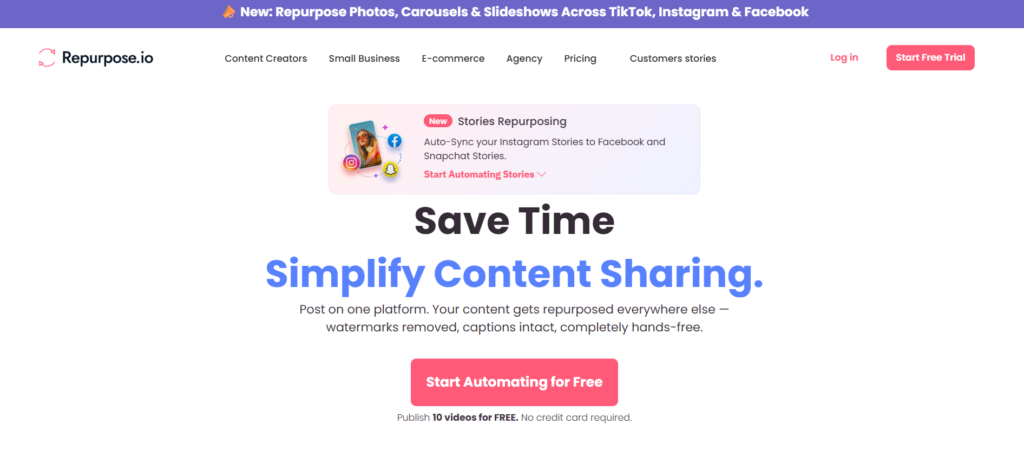
They pitch the platform as a tool that removes manual republishing work entirely, allowing creators to “publish once and distribute everywhere.” The pricing page highlights time savings and audience growth as the primary outcomes, and the testimonials from named creators like Doc Williams (Founder of Brand Factory Inc) and content coach Yong Pratt reinforce the workflow efficiency angle. The free trial allows publishing up to 10 videos over 14 days with no credit card required, which is a relatively low-friction entry point.
What Users Report
User sentiment across review platforms is broadly positive, particularly among podcasters and video creators who publish content regularly. The recurring praise focuses on interface simplicity, ease of workflow setup, and the practical time savings from automating repetitive publishing. The ability to maintain consistent presence across multiple channels without manual effort is the most commonly cited benefit.
The criticism pattern is equally consistent. Users who want more than distribution — specifically those looking for AI-powered clip selection, advanced trimming, or built-in performance analytics — report that the tool falls short. Several reviews frame it explicitly as a business efficiency tool rather than a creative suite, which is an accurate and fair characterization. It’s not a weakness so much as a clear scope limitation.
How It Stacks Up Against the Category
In the current content tool landscape, Repurpose.io occupies a distinct position. Most of its named competitors have moved toward AI-driven creative features — clip discovery, auto-captioning, engagement scoring. Repurpose.io’s edge is reliability and breadth of distribution rather than content intelligence. For creators who already have a strong production process and just need reliable syndication, that’s a genuine strength. For creators who want the tool to do more of the creative work, the gap is real.
Repurpose.io vs Competitors
Comparing Repurpose.io against tools like Blotato and other social automation platforms reveals a clear positioning difference. The table below covers feature availability and pricing only — no invented benchmarks.
| Feature | Repurpose.io | Opus Clip | Descript |
|---|---|---|---|
| Automated multi-platform publishing | Yes | Partial | No |
| AI-powered clip selection | No | Yes | Partial |
| Full video editing suite | No | No | Yes |
| Podcast distribution support | Yes | Partial | Yes |
| Built-in analytics | No | Yes | Partial |
| Starting price (monthly) | $35/month | Varies | Varies |
For creators who want to understand the broader social automation space, our review of Cre8Virals covers a different angle on content distribution tools worth comparing.
Pricing
Repurpose.io uses a tiered subscription model with three plans. All plans include a 14-day free trial with no credit card required, and the trial allows publishing up to 10 videos or audio files.
On monthly billing: the Starter plan is $35/month, covering up to 3 connected accounts per social network and 5,000 published videos per month. The Pro plan is $79/month, with up to 10 accounts per network and unlimited monthly publishes. The Agency plan is $179/month, supporting up to 25 accounts per network with unlimited publishes.
Annual billing brings the costs down to $349/year (Starter), $790/year (Pro), and $1,790/year (Agency), which the pricing page expresses as roughly $0.97/day, $2.19/day, and $4.97/day respectively. For current plan details and any promotional pricing, check the official pricing page directly since rates can change.
Pros and Cons
- Genuine time savings for high-volume creators: The automation model removes repetitive manual work for podcasters and video creators distributing across multiple platforms.
- Low learning curve: User reports consistently describe the interface as intuitive and the workflow setup as relatively straightforward, even for non-technical users.
- Broad platform support: The integration list covers the major social networks including TikTok, Instagram, YouTube Shorts, LinkedIn, Facebook, Pinterest, and Snapchat.
- Good fit for podcast promotion: Podcast-to-social workflows are a well-documented strength, with users specifically praising how it handles audio-to-video distribution.
- Low-risk trial: The 14-day free trial with no credit card required lets you test real workflows before committing.
- No AI clip selection or editing: If you need the tool to find the best moments in your video or trim content intelligently, this isn’t the right tool. It moves content; it doesn’t curate it.
- Weak native analytics: User reviews flag the lack of meaningful performance data inside the platform as a real gap, especially compared with more analytics-forward competitors.
- Not standalone for creators who need editing: You’ll likely need a separate editing tool alongside it, which adds cost and workflow complexity.
Who Should Use Repurpose.io?
Podcasters with existing audiences are probably the best fit. If you’re releasing weekly episodes and want those episodes to automatically appear as audiograms or video clips on YouTube, TikTok, Instagram, and LinkedIn, this platform handles that workflow reliably.
Solo creators and small teams managing multiple channels will get value from the account-per-network structure on the Starter and Pro plans. Maintaining consistent posting across five platforms manually is a time drain; automating it is a real win.
Agencies handling multiple client accounts should look at the Agency plan, which supports up to 25 accounts per social network — enough to run a meaningful client base without hitting limits constantly.
Creators who need AI to do the creative heavy lifting — finding viral moments, writing captions from scratch, optimizing content per platform — should look at alternatives. Repurpose.io expects you to bring the finished (or near-finished) content; it handles the distribution side, not the content intelligence side. Similarly, if built-in analytics are critical to your workflow, you’ll hit this tool’s ceiling quickly.
Frequently Asked Questions
What is Repurpose.io and how is it different from AI content tools?
Repurpose.io is a workflow-based content distribution and syndication platform. It automates publishing existing content across multiple social media channels. Unlike AI-first content tools, it doesn’t generate content, select clips automatically, or analyze engagement. Its strength is automating the distribution of content you’ve already created.
Does Repurpose.io have a free trial?
Yes. The platform offers a 14-day free trial with no credit card required. During the trial you can publish up to 10 videos or audio files to connected social platforms, which is enough to test real workflows before choosing a paid plan.
What platforms does Repurpose.io publish to?
According to the platform’s pricing and integration pages, supported destinations include Instagram, TikTok, YouTube Shorts, Facebook, LinkedIn, Pinterest, Snapchat, X (Twitter), and others. Source content can come from YouTube, TikTok, podcast feeds, Dropbox, Google Drive, and similar sources.
Is Repurpose.io good for podcasters?
User reports specifically call out podcast-to-social workflows as one of the platform’s strongest use cases. It can take new podcast episodes and automatically distribute them across multiple social channels in formats suited to each platform, which fits the needs of podcasters who want broader reach with less manual effort.
What are the main limitations of Repurpose.io?
The main limitations, consistently flagged in user reviews, are the lack of AI-powered clip selection, limited video editing capabilities, and weak native analytics. It’s an automation and distribution tool, not an all-in-one content creation or optimization platform.
Final Verdict
Repurpose.io is a well-scoped tool that does one thing well: it automates the distribution of existing content across multiple social platforms. If you produce content at volume — weekly podcasts, regular YouTube videos, recurring live streams — and you’re spending meaningful time on manual cross-posting, the workflow automation here genuinely solves that problem. The pricing is reasonable for what you get, the trial is low-risk, and the user feedback is consistently positive on the core use case.
Where it falls short is equally clear. It’s not an AI content studio. It won’t find your best clips, generate captions, or tell you what’s performing. If you’re looking for those features, you’ll need to pair Repurpose.io with a more capable editing or analytics tool — or choose a different product entirely. The honest recommendation: if you need distribution automation, it’s a solid pick. If you need creative intelligence, keep looking.
Review Methodology
This review is based on analysis of Repurpose.io’s official documentation, pricing pages, and published feature set, combined with user reports gathered from product review platforms and creator community discussions. No hands-on testing was conducted. All pricing figures are drawn directly from the Repurpose.io pricing page as scraped for this research. Specific claims about feature availability and user sentiment reflect patterns found in the available research data, not invented outcomes.