

Disclosure: Some of the links on Daily Digital Reviews are affiliate links. This means that if you click on a link and make a purchase, we may earn a small commission — at no extra cost to you.
AI Email Creation Is Crowded — Does MigmaAI Stand Out?
MigmaAI promises to generate branded, professional emails from a plain-English prompt — no drag-and-drop canvas required. That’s a bold claim in a space already crowded with Mailchimp, BeeFree, and Canva. So I looked hard at what MigmaAI actually offers, what it costs, and whether the feature set holds up against the competition.
The pitch is simple: describe the email you want, and the AI handles design, copy, images, and compatibility. You can then refine it in a visual editor and either export to your sending platform or send directly through Migma. On paper, that’s a genuinely different workflow from starting with a blank template. Whether it delivers in practice depends on the specifics — and that’s what this review breaks down.
Quick Verdict: MigmaAI is a focused AI email production tool with a genuinely different approach — prompt-first generation backed by multiple AI models, Figma imports, and visual editing. It’s a solid fit for marketers who want speed and design flexibility without learning a full drag-and-drop builder. The main caveats are limited independent review depth and a scope that stops at email creation rather than full marketing automation.
Overall Rating: 3.5 / 5 ⭐
Feature depth: 3.5/5 · Ease of use: 4/5 · Pricing value: 3/5 · Trust signals: 3.5/5
What Is MigmaAI?
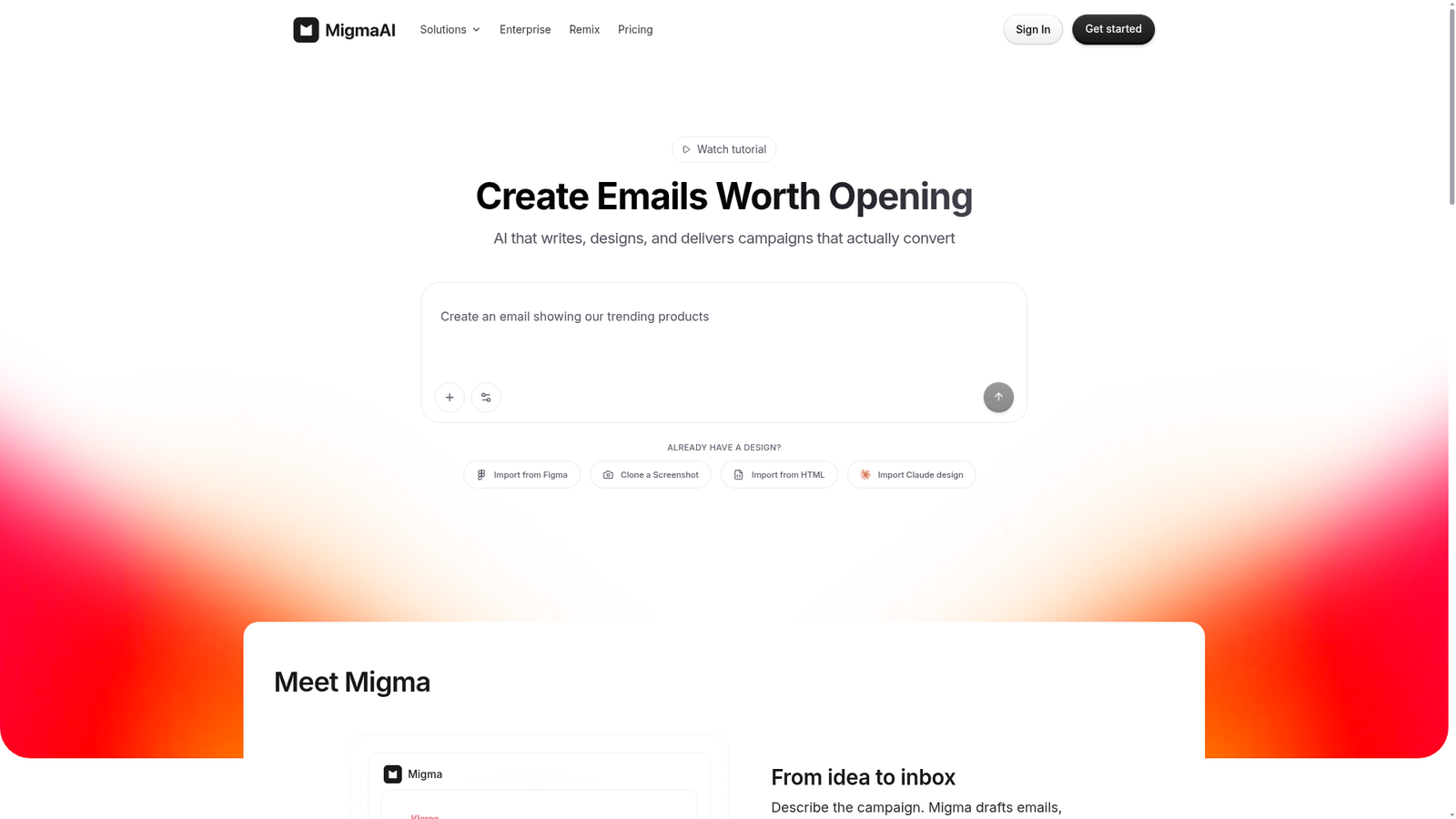
MigmaAI is an AI-powered email creation platform built for marketers, founders, and agencies who need to produce on-brand emails fast. It sits in the email design category but takes a prompt-first approach rather than asking you to start from a template library or a blank canvas.
Its key differentiator, according to the company’s own materials, is the combination of prompt-based generation with a visual editor and support for multiple AI model backends — including OpenAI’s ChatGPT, Google’s Gemini, and Anthropic’s Claude, as noted on a SourceForge comparison page. It also pulls in external context from websites, documents, and Figma designs, making it closer to an AI-assisted email production environment than a simple text generator.
The product is intended for both standalone design workflows and integrated email delivery, with export options to platforms like Mailchimp and Klaviyo, or direct sending through Migma itself.
Key Features
Prompt-Based Email Generation
You describe the email you want in plain English — “a product launch email for our spring collection” — and MigmaAI builds the layout, writes the copy, sources or generates images, and handles email client compatibility. No design skills needed to get a working first draft.
Multi-Model AI Support
According to a SourceForge comparison page, MigmaAI supports multiple underlying AI models: ChatGPT, Gemini, and Claude. The Business plan specifically mentions access to the best AI models as a feature, which suggests model selection or routing may vary by plan tier.
Figma Import and Design References
Users can drop a Figma frame directly into Migma and get editable email HTML back. This is documented on the pricing page and positions MigmaAI as a useful bridge for design teams that already work in Figma.
URL Content Fetching and Document References
The workflow supports pulling content from URLs and attaching documents as context. This means you can point the tool at a product page or upload a brief, and it uses that material to make the email more relevant — rather than generating generic filler.
Visual Editor and Responsive Previews
Once the AI produces a draft, a visual editor lets you refine it. The tool also previews emails across devices, which matters for deliverability and layout consistency across mobile and desktop inboxes.
Export and Direct Sending
MigmaAI exports to Mailchimp and at least five other platforms on the Premium plan, per the pricing page. The Business plan includes direct sending up to 3 million emails per month, meaning it can act as both a design and sending tool.
How MigmaAI Works
Step 1: Start With a Prompt
According to the vendor’s documentation and a YouTube walkthrough, a user starts from a free or paid account, then writes a plain-English description of the email they need. You can optionally set preferences for style, language, and generation speed.
Step 2: Add Context (Optional)
The workflow supports attaching a website URL, uploading a document, or importing a Figma design as reference material. There’s also an AI agent feature described in the tutorial as “superpower” that can pull live information from the internet to make the email more relevant.
Step 3: Review and Edit
The AI generates the email for review. From there, a visual editor lets you make adjustments to copy, layout, and images without touching code. This is the stage where human judgment matters most for brand tone and accuracy.
Step 4: Export or Send
The finished email can be exported as HTML to any sending platform, pushed directly to integrated tools like Mailchimp or Klaviyo, or sent through Migma’s own sending infrastructure on higher plans.
What the Evidence Shows
What the Vendor Claims
MigmaAI’s pricing page describes the product as capable of generating on-brand emails in about 30 seconds. They pitch it as an alternative to drag-and-drop builders like Mailchimp and Klaviyo, positioning Migma as the creation layer that feeds into those sending platforms. The FAQ on the pricing page states: “Migma creates the emails, while Mailchimp/Klaviyo send them.” That’s a clear and honest positioning of scope.
What Users Report
Independent review volume in the available sources is limited. However, the Product Hunt listing and several testimonials on the pricing page offer some signal. A Cloudflare solution engineer noted the tool “automatically pulled brand assets from the website and instantly kicked out a really compelling email template.” An e-commerce manager at Doghook described it as making email marketing “a million times easier” for people juggling multiple roles. A CMO quoted on the pricing page highlighted the end-to-end workflow from Figma to responsive campaigns. These are vendor-curated testimonials, so they should be read with appropriate skepticism, but the themes — speed, ease of use, and design quality — are consistent. A Capterra listing reports a starting price of $34.99/month with a free trial, which aligns with the paid plan structure visible on the pricing page.
How It Stacks Up Against the Category
Compared with template-first builders like BeeFree and Stripo, MigmaAI’s AI-first approach is genuinely different — you’re not browsing a gallery of templates, you’re describing an outcome. Compared with Mailchimp, it’s narrower by design: no list management, segmentation, or automation sequences. That’s not a weakness if you already have a sending tool and just want to produce better emails faster. It’s a weakness if you’re looking for one tool to handle everything.
MigmaAI vs Competitors
For context on where MigmaAI fits in the broader email tooling landscape, it’s worth comparing against some alternatives. We’ve also reviewed tools like Loova and LandCopyAI if you’re looking at AI-assisted content creation more broadly.
| Feature | MigmaAI | BeeFree | Mailchimp |
|---|---|---|---|
| Prompt-to-email generation | Yes | Partial | Partial |
| Multi-model AI support | Yes (GPT, Gemini, Claude) | No | No |
| Figma import | Yes | No | No |
| Visual editor | Yes | Yes | Yes |
| Email automation / CRM | No | No | Yes |
| Free access available | Yes (10 credits/day) | Yes | Yes |
| Starting paid price | ~$34.99/mo | From $15/mo | From $13/mo |
Pricing
MigmaAI offers a free account with 10 credits per day, as noted in a YouTube tutorial. Paid plans include a Premium tier (100 AI emails per day, 200K emails/month sending, compatibility testing, Figma import, export to Mailchimp and 5+ platforms) and a Business tier (unlimited AI emails, unlimited AI images, 3M emails/month sending, real-time team collaboration, unlimited brand kits, priority support, 2 seats included). An Enterprise plan with custom limits, SSO, and SOC 2/GDPR/ISO 27001 compliance is also available. A Capterra listing reports a starting price of approximately $34.99/month for the paid tier. A 7-day free trial is offered. For current pricing, confirm directly at MigmaAI.
Pros and Cons
Pros
- Genuinely fast email drafting from plain-English prompts — the core promise is well-supported by feature documentation and user testimonials
- Multi-model AI support (ChatGPT, Gemini, Claude) gives more flexibility than single-model tools
- Figma-to-email conversion is a useful bridge for design-led teams, documented on the pricing page
- Context ingestion from URLs and documents means outputs can be more relevant than generic AI copy
- Free tier with daily credits lowers the barrier to trying it before committing to a paid plan
Cons
- No email automation, list management, or CRM — it’s a creation tool, not a full marketing platform
- Independent review depth is limited; it’s hard to assess long-term reliability or support quality from available sources
- Paid plan pricing (around $34.99/month) is higher than entry-level competitors like BeeFree or Mailchimp, though the feature set is different
Who Should Use MigmaAI?
Marketers and content teams producing high email volume will get the most out of the prompt-to-email workflow. If you’re sending regular campaigns and spending hours on design, the speed gain is meaningful.
Founders and small teams wearing multiple hats are a natural fit. The tool doesn’t require design skills, and a free daily credit tier lets you test it without commitment.
Agencies and design teams already in Figma should find the Figma import feature particularly useful — converting designs to responsive email HTML manually is tedious, and MigmaAI appears to handle this directly.
Teams that need full marketing automation — segmentation, triggers, A/B testing, list analytics — should look elsewhere. MigmaAI is a creation tool first. You’d still need Mailchimp, Klaviyo, or a similar platform for sending and automation. If you’re evaluating other AI content tools, our Kraflio review covers another option worth considering.
Frequently Asked Questions
Does MigmaAI require design experience?
No. The tool is built around plain-English prompts. According to the pricing page FAQ, you simply describe the email you want — “Create an email about our trending products” — and MigmaAI handles design, copy, images, and compatibility automatically.
Can I use MigmaAI with Mailchimp or Klaviyo?
Yes. The Premium plan exports to Mailchimp and at least five other platforms, per the pricing page. The product is explicitly designed as a creation layer that feeds into sending platforms rather than replacing them.
Is there a free plan or trial?
Yes. A YouTube walkthrough describes a free account that includes 10 credits per day. The pricing page also offers a 7-day free trial for paid plans, with no charge due until the trial ends.
What is MigmaAI’s refund policy?
The pricing page FAQ states a 30-day money-back guarantee — if the product doesn’t save you time and money, a full refund is offered with no questions asked.
Final Verdict
MigmaAI has a clear and defensible position: it’s an AI-first email creation tool that skips the blank canvas and delivers a working draft from a prompt. The multi-model AI support, Figma import, and URL content fetching put it ahead of simpler prompt-to-email generators. The visual editor means you’re not locked into whatever the AI produces.
The honest caveats are scope and review depth. This tool doesn’t replace Mailchimp — it feeds into it. And with limited independent reviews available, it’s hard to give a confident long-term reliability score. That said, a 30-day money-back guarantee and free daily credits mean the risk of trying it is low. If your bottleneck is email creation rather than sending infrastructure, MigmaAI is worth a serious look.
Review Methodology
This review is based on analysis of MigmaAI’s official documentation, pricing page, and feature descriptions, combined with user reports gathered from Product Hunt, Capterra, a SourceForge comparison page, and a YouTube product walkthrough. No hands-on testing was conducted.