
Disclosure: Some of the links on Daily Digital Reviews are affiliate links. This means that if you click on a link and make a purchase, we may earn a small commission — at no extra cost to you.
Can AI Really Write You a Full Song?
The Suno review question most people ask is simple: does it actually work, or is it just a party trick? I’ve looked at the feature set, the pricing pages, the official documentation, and what users across multiple platforms are saying. Suno sits in a crowded AI music generator category, but it does something most competitors don’t — it generates complete songs with vocals, lyrics, instrumentation, and arrangement from a single text prompt. That’s a meaningful difference, and it’s worth unpacking whether it holds up in practice.
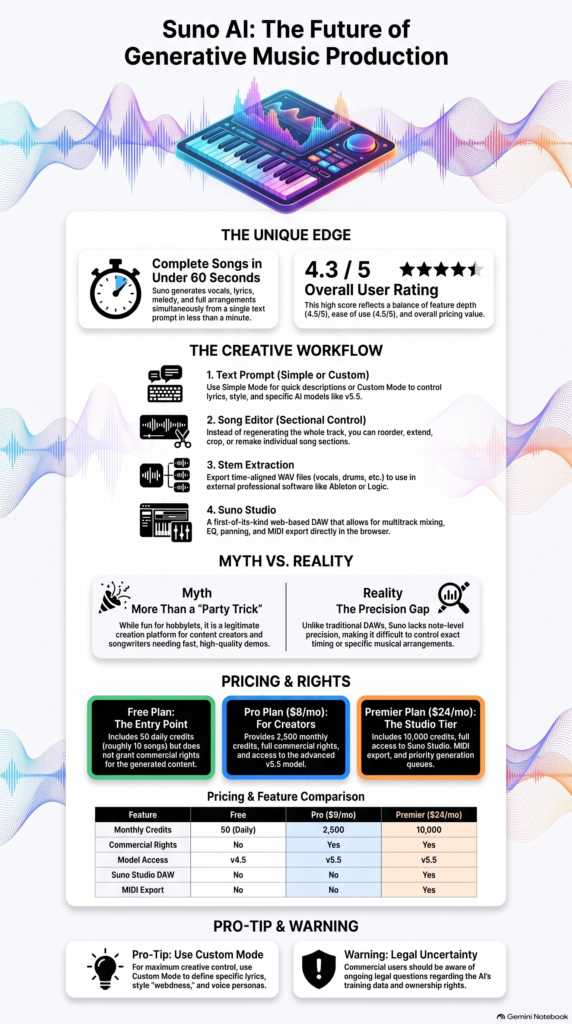
Quick Verdict: Suno is one of the most accessible AI music tools available right now. It’s genuinely impressive for non-musicians who want a full song fast, and the newer Studio and stem features make it more useful for serious creators too. The main caveats are inconsistent output quality, a hard paywall on the best tools, and ongoing legal questions around training data that prospective commercial users should not ignore.
Overall Rating: 4.3 / 5 ⭐
Feature depth: 4.5/5 · Ease of use: 4.5/5 · Pricing value: 4.0/5 · Trust signals: 4.0/5

What Is Suno?
Suno is a browser-based AI music generator that turns text prompts into finished songs. Unlike tools that output instrumental loops or backing tracks, it generates vocals, lyrics, melody, and a full arrangement together. The official site describes it as a platform for everyone from first-time creators to professional producers, and it’s featured in publications including Rolling Stone, Billboard, Wired, and Variety. The free tier lets you create up to 10 songs per day with no credit card required. Paid plans unlock more credits, commercial rights, and increasingly advanced production tools — including a browser-based DAW called Suno Studio on the top tier.
Key Features
Text-to-Song Generation
The core feature is still the simplest one: type a prompt, get a song. Simple Mode takes a single description and handles everything. Custom Mode adds separate fields for lyrics, style, title, voices or personas, model selection, creative sliders (weirdness, structure, reference-bias), and an exclusion field. The v5.5 model is available on paid plans and described on the pricing page as their best and most personalized AI music model.
Song Editor
The Song Editor lets you work on a track section by section rather than regenerating the whole thing. You can reorder, rewrite, extend, crop, and remake individual parts. You can also upload your own audio (up to 30 minutes on paid plans) and extend or edit it alongside AI-generated content. This is a meaningful upgrade over a one-shot generator.
Stem Extraction and Suno Studio
Pro users get two stem separation types; Premier users get three. Stems export as time-aligned WAV files for use in Ableton, Logic, or any other DAW. Premier also unlocks Suno Studio, which the company describes as a first-of-its-kind web-based generative audio workstation — a multitrack timeline editor with AI stem generation, EQ, faders, pan, solo, mute, and MIDI export built in. That’s a lot of functionality for a browser tool.
How Suno Works
The Generation Pipeline
According to the vendor’s documentation, Suno jointly generates lyrics, melody, instrumentation, vocals, and mix in a single pass. You enter a prompt (or use Custom Mode for more control), hit create, and the system produces a complete track in under a minute. The free tier runs on a shared queue using the v4.5 model; paid users get priority access and the newer v5.5 model.
Editing and Export Workflow
After generation, the Song Editor opens up section-level control. From there you can extend a track, rewrite lyrics in specific sections, or split the song into stems. On the Premier plan, you can drag those stems into Suno Studio’s multitrack editor for further mixing, or export WAV and MIDI files to continue in an external DAW. The general workflow moves from prompt → song → stems → external production if needed.
What the Evidence Shows
What the Vendor Claims
Suno positions itself as the number one AI music app, citing a 4.9-star rating from over 363,000 iOS reviews and a 4.8-star rating from over 653,000 Android reviews on the official pricing page. They claim it’s used by everyone from first-time creators to top producers and songwriters, and that the tool can produce a complete, original song with vocals and full production from a single prompt in under a minute.
What Users Report
User sentiment across reviews is broadly positive on speed, ease, and novelty. Users without music production backgrounds consistently praise how quickly they can get a polished-sounding result. The expanding editing tools — specifically stem splitting and the Song Editor — are highlighted as meaningful upgrades. Common criticisms are consistent though: lyric quality can be uneven, output is sometimes unpredictable, and users who want precise control over arrangement or notes find Suno falls well short of a traditional DAW. A recurring concern in coverage is legal uncertainty around training data and what that means for commercial use.
How It Stacks Up Against the Category
Most AI music tools generate instrumental loops or stem beds. Suno’s focus on full songs with vocals is genuinely distinctive in the category. The addition of Suno Studio also pushes it into territory most competitors haven’t entered yet. The weakness is fine-grained precision — if you need to control exact notes, timing, or arrangement structure, you’re still better served by a real DAW with AI assistance than by a prompt-first tool like Suno.
Suno vs Competitors
Suno’s closest rivals are ElevenLabs (for AI audio broadly) and tools like Udio, AIVA, Soundraw, and Mubert. Here’s how the feature sets compare based on available documentation:
| Feature | Suno | Udio | AIVA / Soundraw |
|---|---|---|---|
| Full song with vocals | Yes | Yes | Instrumental focus |
| Text prompt input | Yes | Yes | Partial |
| Stem extraction | Yes (paid) | Yes (paid) | Limited / No |
| Browser-based DAW | Yes (Premier) | No | No |
| Free tier available | Yes | Yes | Limited / Trial |
| Commercial rights | Paid plans | Paid plans | Paid plans |
| Starting price/month | $8 | ~$10 | Varies |
For content creators who want songs with vocals, Suno is the clearest choice in this group. For sync licensing or purely instrumental production, AIVA or Soundraw may be a better fit. If you’re using other AI audio tools, it’s also worth checking the ElevenLabs review and our Google Flow review for context on where AI audio is heading.
Pricing
Suno’s free plan gives you 50 credits per day (roughly 10 songs), access to the v4.5 model, and non-commercial use only. The Pro plan is $8/month (or less with annual billing) and includes 2,500 monthly credits, the v5.5 model, commercial rights, two types of stem separation, audio uploads up to 30 minutes, Personas and Voices, and early feature access. Premier is $24/month and adds 10,000 credits, Suno Studio, three stem separation types, and MIDI export. Annual billing saves 20% on both paid plans. Always check suno.com for the latest pricing, as it has changed before.
| Plan | Monthly price | Annual billing equivalent | Annual price | Annual savings | Monthly credits |
|---|---|---|---|---|---|
| Free | $0 | — | — | — | 50 renewed daily |
| Pro | $10 | $8/month | $96 | $24 | 2 500 |
| Premier | $30 | 24/month | $288 | $72 | 10 000 |
Pros and Cons
Pros
- Generates complete songs with vocals, lyrics, and full arrangement from a short text prompt
- Very fast — tracks can be generated in under a minute
- Genuinely accessible for beginners with no music training
- Stem extraction exports clean, time-aligned WAV files compatible with Ableton, Logic, and other DAWs
- Suno Studio on Premier tier adds browser-based multitrack editing, MIDI export, and mixing controls — functionality most competitors don’t offer
Cons
- Lyric quality is inconsistent, and output can be unpredictable across generations
- Much less precise control than a traditional DAW — not suited for note-level or arrangement-level work
- The best features (v5.5 model, Studio, stems) are paywalled, and legal concerns around training data are a real consideration for commercial use
Who Should Use Suno?
Suno works best for content creators who need background music or original songs for YouTube, podcasts, or social media without hiring a composer. It’s also a strong fit for songwriters who want to quickly demo song ideas without production skills, and for hobbyists who just want to explore and share music for fun.
It’s less suited for professional music producers who need note-level control, sync licensing clients who need clean chain-of-title documentation, or anyone whose workflow depends on exact, repeatable results. If you’re already working in a real DAW and want AI assistance within that environment, Suno Studio is interesting but still limited compared to dedicated plugins.
The legal uncertainty around AI training data is worth taking seriously if you plan to release music commercially. It’s not a dealbreaker for everyone, but it’s a real issue you should research before committing to a paid plan for commercial projects.
The Main Facts
FAQ
Can I use Suno for free?
Yes. The free plan gives you 50 credits per day (about 10 songs), access to the v4.5 model, and no credit card is required. Free-tier songs can’t be used commercially.
Do I own the songs I make with Suno?
On paid plans, Suno grants commercial use rights for songs you create. The free tier is non-commercial only. Given ongoing industry-wide legal questions about AI-generated music and training data, reviewing the current terms of service directly is recommended before commercial release.
What’s the difference between Pro and Premier?
Pro ($8/month) gives you 2,500 credits, commercial rights, the v5.5 model, and two types of stem separation. Premier ($24/month) adds 10,000 credits, Suno Studio (the browser-based DAW), a third stem separation type, and MIDI export. Pro covers most individual creators; Premier is for those who want a full production workflow in the browser.
How does Suno compare to Udio?
Both generate full songs with vocals from text prompts and are the two most feature-rich tools in this category. Suno’s main edge right now is the Suno Studio DAW on the Premier tier, which Udio doesn’t currently match. Output quality and style preferences between the two are largely subjective — both have strengths depending on genre and prompt style.
Final Verdict
Suno is the most capable text-to-song platform available at this price point. If you want a full song — vocals, lyrics, arrangement — from a two-sentence prompt, nothing in the category matches how quickly and accessibly Suno delivers that. The Song Editor, stem tools, and Suno Studio on Premier genuinely move it from novelty generator toward a usable creation platform.
The real limitations are unpredictable output quality, a significant paywall before you get the best tools, and legal questions around commercial use that haven’t been fully resolved. For casual creators and content producers, those are acceptable tradeoffs. For professional or commercial use, go in with eyes open and read the terms carefully before you build a workflow around it.
Review Methodology
This review is based on analysis of the vendor’s documentation, pricing pages, and feature set, combined with user reports gathered from Trustpilot, Reddit, and general expert coverage, as well as the official iOS and Android app store ratings cited on Suno’s pricing page.