
Disclosure: Some of the links on Daily Digital Reviews are affiliate links. This means that if you click on a link and make a purchase, we may earn a small commission — at no extra cost to you.
What Problem Does Glam AI Actually Solve?
The Glam AI review question worth asking is simple: can an AI app genuinely replace a portrait session for everyday content creators? Most people don’t have studio access, a professional photographer on call, or hours to spend in Photoshop. Glam AI targets that gap directly — it’s a web and mobile app built around AI-generated glamour portraits, headshots, and fashion-style visuals, designed for users who want polished, social-media-ready images without any editing experience. I analyzed the feature set, pricing docs, and available user feedback to give you a clear picture of what it actually delivers.
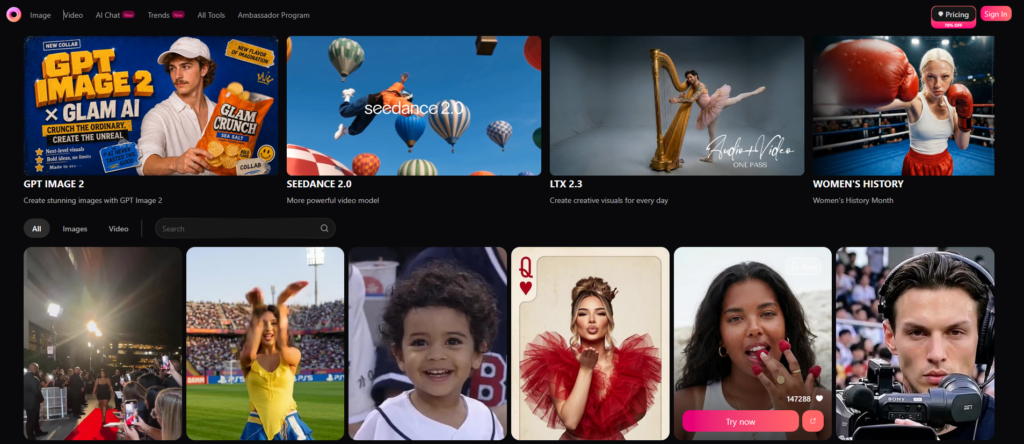
Quick Verdict: Glam AI works well if your goal is fast, attractive portraits for social media or personal branding. The free tier lets you sample the experience, but real use costs money, output quality isn’t always consistent, and it doesn’t suit users who want full creative control or guaranteed likeness accuracy.
Overall Rating: 3.5 / 5 ⭐
Feature depth: 3.5/5 · Ease of use: 4/5 · Pricing value: 3/5 · Trust signals: 3.5/5
What Is Glam AI?
Glam AI is an AI photo and video editor developed by Glam Labs, focused specifically on glamour-style portrait generation. It sits at the intersection of consumer beauty apps and generative AI — somewhere between Lensa’s magic avatar concept and a lightweight photo studio. The product is available on web, iOS, and Android, and it’s aimed at beginners, casual content creators, influencers, and anyone who wants professional-looking profile pictures, dating-app photos, or social content without hiring a photographer.
What sets it apart from broader AI image tools is its deliberate focus on polished, editorial, and fashion-forward aesthetics. It’s not trying to compete with open-ended creative tools like Midjourney or DALL-E. Instead, it asks: how fast can we turn your selfie into something that looks like a magazine shoot? That’s a narrow brief, and the tool stays mostly within it. The company describes access to “2000+ ready-to-use styles” and claims a user base it lists as 10 million active users worldwide on its pricing page.
Glam AI (web link) Glam AI (app link)
Key Features
AI Portrait and Headshot Generation
The core feature is identity-preserving image generation. You upload reference photos, and Glam AI produces new images in various styled formats — beauty shots, editorial looks, professional headshots, and fashion-inspired poses — while trying to keep your face recognizable. The app’s own testimonials on the pricing page include users noting that “my freckles and features stay the same in every look,” which tells you the identity-preservation angle is a key selling point. Results vary in practice, as discussed below.
Style Templates and Trend-Based Looks
The platform offers a large library of style presets. According to the pricing page, this includes “trend-based looks” and over 2,000 ready-to-use styles. Free users get access to a subset of these; broader model and style access scales with paid tiers. The Trends section on the site (glam.ai/trends/viral-trends) suggests the team actively updates styles to reflect social media trends, which matters if you’re trying to stay current for content.
Video Generation and VFX
Glam AI isn’t only a photo tool. The pricing page lists video creation, VFX effects, Motion Swap, and Daily Reels (marked as coming soon) as feature-set items. Multiple video generation models are listed under paid tiers, including access to third-party models like Kling, Veo, and Sora depending on your plan. This makes the platform more versatile than a simple headshot app, though the depth of video editing controls isn’t detailed in publicly available documentation.
Output Resolution and Image Editing
Free users can access 2K images and videos, while 4K output is locked behind paid plans. There’s also a 4K image upscale tool available to paid subscribers. The feature set includes image editing capabilities — lighting adjustment, skin smoothing, and background blur are mentioned in user review commentary — so it’s not purely generative. There’s a post-generation refinement layer that lets users adjust results rather than just accepting raw outputs.
AI Chat and Multi-Model Access
The platform also includes an AI chat feature and access to multiple third-party generation models. The Basic plan gives access to 3 of 22 listed top models; Ultimate gives 8; Creator gives 15. This positioning — as a multi-model hub rather than a single proprietary engine — is notable and separates it from single-model competitors.
How Glam AI Works
Step 1: Upload Reference Photos
According to the product’s documentation and feature descriptions, users start by uploading a set of selfies or portrait images. The system uses these as reference inputs to extract facial features, identity markers, and appearance cues. The more varied and clear the input photos, the better the model can preserve recognizable features in generated outputs.
Step 2: Choose a Style or Model
Users then select from available style presets, trend-based templates, or specific AI models. The free tier gives access to Glam Labs’ own models and a limited model pool. Paid tiers unlock access to additional third-party models like FLUX Kontext Pro, Seedream 4.0, and various Kling versions. Styles range from beauty and glamour portraits to editorial and fashion-forward aesthetics.
Step 3: Generate and Refine
The app processes the inputs using a combination of generative image synthesis and enhancement filters. The output comes back as one or more styled images. Users can then apply post-generation adjustments — the feature set mentions lighting, skin smoothing, and background editing tools. Fast generations use a daily credit allowance; slow generations are unlimited across all tiers including the free Basic plan.
What the Evidence Shows
What the Vendor Claims
Glam AI positions itself around speed, identity preservation, and social-media readiness. On their pricing page they claim a 4.6 out of 5 rating and a user base of 10 million active users worldwide. The on-site testimonials emphasize that outputs “feel polished and realistic without plastic skin” and that facial details like freckles remain intact. Their marketing also points to media coverage from Forbes, USA Today, Rolling Stone, and Entrepreneur, which suggests a degree of mainstream visibility. They pitch the tool as “all your models in one place” — a broader creative hub rather than just a portrait filter.
What Users Report
User sentiment in review commentary is generally positive but with consistent caveats. Positive themes cluster around ease of use, fast generation speed, and the ability to produce attractive images without any editing background. People find it useful for social media profiles, personal branding shots, and fun experimentation. The on-platform reviews are predictably glowing, but broader user feedback raises recurring issues: outputs don’t always look sufficiently like the person who uploaded the photos, results can feel overly stylized or heavily smoothed, and users frequently run into paywalls when trying to access the better styles or higher-resolution exports. The free tier generates enough interest to get people in the door but pushes serious users toward paid upgrades quickly.
How It Stacks Up Against the Category
In the consumer AI portrait space, Glam AI is most directly comparable to Lensa AI. Both are identity-preserving portrait generators aimed at non-technical users. Glam AI differentiates by branching into video, multi-model access, and a trend-focused style library — features Lensa doesn’t meaningfully offer. Remini focuses more on enhancement and restoration of existing photos rather than generative transformation. YouCam Perfect is a broader beauty suite with more manual control but less generative depth. Where Glam AI falls short compared to general-purpose tools is creative flexibility — you can’t do the kind of open-ended scene generation that tools like Midjourney offer. That’s a deliberate trade-off, not a flaw, but it matters if your needs extend beyond glamour portraits.
Glam AI vs Competitors
| Feature | Glam AI | Lensa | Remini | YouCam Perfect |
|---|---|---|---|---|
| AI Portrait Generation | Yes | Yes | Partial | Partial |
| Video Generation | Yes | No | No | No |
| Multi-Model Access | Yes | No | No | No |
| Free Tier | Yes | Partial | Yes | Yes |
| 4K Output | Paid only | Paid only | Paid only | Paid only |
| Trend-Based Styles | Yes | No | No | Partial |
If you’re deciding between Glam AI and its closest competitors, also consider checking our reviews of Instant UGC for AI-driven content creation, or Amadora AI for another angle on AI visual tools.
Pricing
Glam AI uses a freemium model with four tiers. The Basic plan is free and includes 5 fast generations per day, unlimited slow generations, access to Glam Labs models, and 2K resolution outputs. It gives access to 3 of the 22 listed top models and does not allow concurrent generations.
Above that sit three paid plans: Pro, Ultimate, and Creator. Each unlocks more of the 22 available top models (5, 8, and 15 respectively), adds concurrent generation slots (2, 3, and 4), and maintains 4K image and video output. All paid tiers include early access to new models and advanced AI features. The exact monthly prices aren’t displayed in static form on the pricing page — the numbers animate on-screen — so for current pricing you’ll need to visit the site directly, as costs may vary by region and promotion. The company offers a 14-day refund policy if you purchased via the website, provided you contact support at supportdesktop@glamlabs.app and submit evidence of low-quality results.
Glam AI (web link) Glam AI (app link)
Pros and Cons
Pros
- Pro: Genuinely beginner-friendly — no editing skills required, minimal workflow friction
- Pro: Broad style library with trend-based updates keeps content feeling current
- Pro: Multi-model access via a single platform is unusual for this category
- Pro: Video generation and VFX features extend usefulness beyond portrait photos
- Pro: Free tier is functional enough to evaluate the tool before committing
Cons
- Con: Output likeness and quality aren’t consistent — some generations don’t look enough like the original person
- Con: Meaningful usage pushes you toward paid plans quickly; free daily fast generations are limited
- Con: Less suitable than general-purpose AI tools for users who want creative flexibility or precise control
Who Should Use Glam AI?
Social media creators and influencers will get the most value here. If you need a steady stream of polished portrait content and don’t want to book shoots, Glam AI’s speed and style variety are genuinely useful.
People who want better profile photos — for LinkedIn, dating apps, or personal branding — can use Glam AI to generate headshot-quality images from home selfies. Results won’t always be perfect, but at the free tier it’s a low-risk experiment.
Beginners with no editing background are the core audience. If you’ve been put off AI image tools by the complexity of prompt engineering or manual retouching, Glam AI removes most of that friction.
Power users and designers should probably look elsewhere. If you need full creative control, open-ended scene generation, guaranteed likeness accuracy, or transparent editing workflows, a tool like Midjourney or a traditional editor will serve you better. Similarly, if your primary need is product photography or background removal, PhotoRoom is more purpose-built for that use case. Also worth exploring is our look at AI Titan 2.0 if you’re weighing broader AI creative tools.
Frequently Asked Questions
Is Glam AI free to use?
Yes, there’s a free Basic tier that includes 5 fast generations per day, unlimited slow generations, and 2K resolution output. Access to premium styles, 4K exports, more AI models, and concurrent generation requires a paid subscription.
How does Glam AI preserve your likeness?
The app uses reference photos you upload to extract facial and appearance features, then uses generative models to produce styled outputs while attempting to maintain identity. Results vary — some users report strong likeness preservation, while others note that outputs occasionally drift from the original face.
What’s the refund policy?
According to the FAQ on the Glam AI site, the company offers refunds for web-purchased subscriptions if you contact support within 14 days of initial purchase and provide evidence of low-quality results. Refund requests go to supportdesktop@glamlabs.app.
Can Glam AI create videos as well as images?
Yes. The platform includes video generation features alongside image creation, including access to multiple third-party video models on paid plans. VFX effects and Motion Swap are also listed as available features, with Daily Reels marked as coming soon.
How does Glam AI compare to Lensa?
Both focus on AI portrait generation with identity preservation. Glam AI goes further by offering video generation, multi-model access, and trend-based style updates. Lensa is more established in the single-use avatar/portrait category but doesn’t match Glam AI’s breadth of generation tools.
Final Verdict
Glam AI is a solid option if you want fast, attractive portrait images for social media without any technical skills. The multi-model approach and video features make it more capable than most direct competitors. That said, quality inconsistency is a real issue, the free tier is limited for regular use, and users who want exact realism or deep creative control will hit the ceiling quickly. Try it for free before committing to a paid plan.
Review Methodology
This review is based on analysis of Glam AI’s official website, pricing page, and feature documentation, combined with user reports drawn from app store listings, third-party review commentary, and on-platform testimonials. Where vendor claims and user reports conflict — particularly around likeness consistency and output quality — both perspectives are noted rather than smoothed over.