Is Saner AI Actually Worth It for Overwhelmed Knowledge Workers?
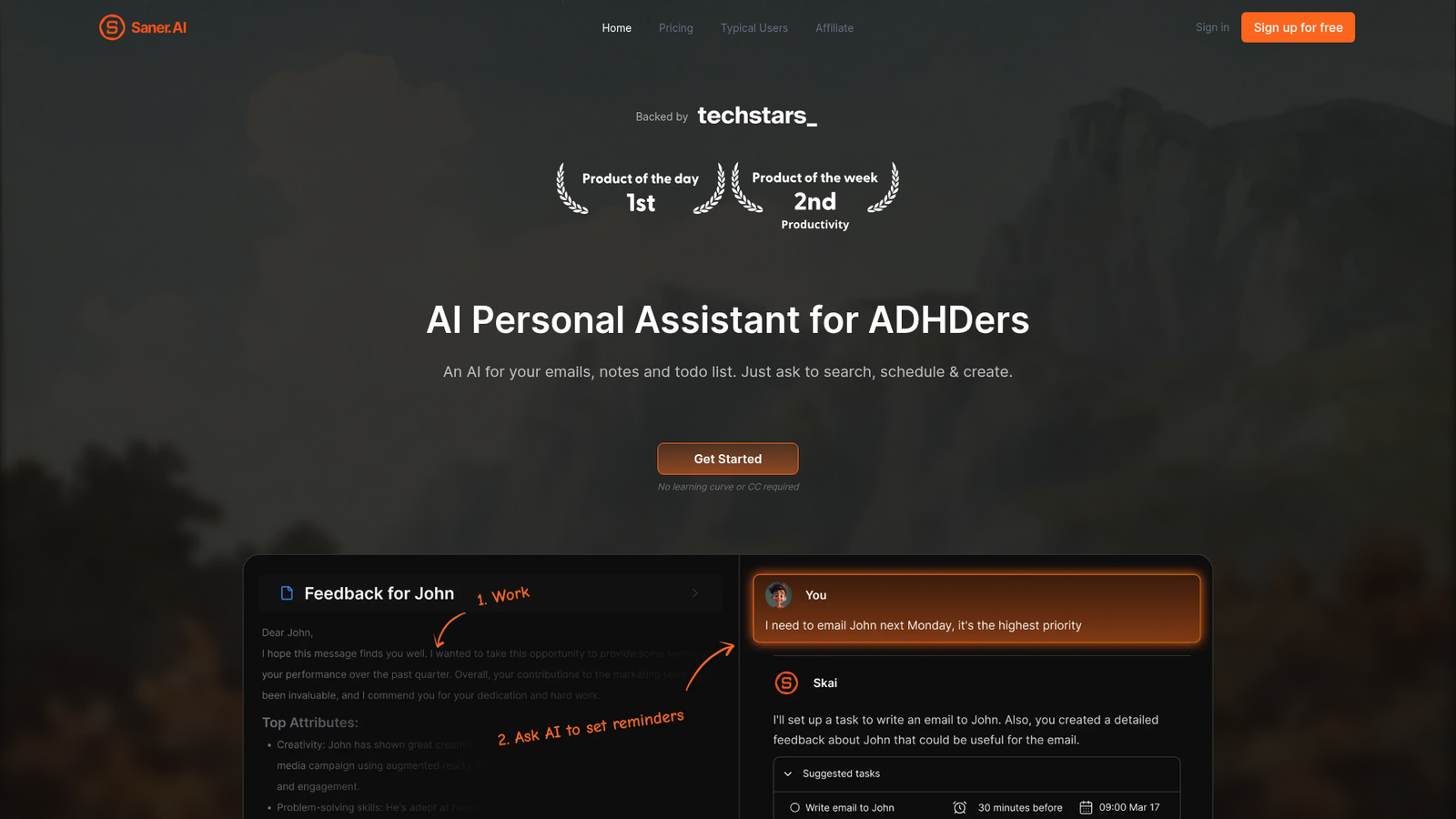
Saner AI is another “second brain” app promising to fix information overload? I’ve heard that pitch from Notion, Obsidian, and a dozen others. But Saner AI caught my attention because it specifically targets ADHD users and knowledge workers — not just productivity enthusiasts — and it ships with an AI assistant named Skai that supposedly handles organization automatically, without you lifting a finger. That’s a bold claim. I spent several weeks testing it across real workflows before writing a single word here.
What I found surprised me. Saner AI is genuinely different from generic note-taking apps in ways that matter for scattered, high-volume thinkers. It’s not perfect — the calendar is underdeveloped and some UI choices still feel rough — but the core promise of reducing cognitive load through smart automation holds up better than I expected.
⚡ Quick Verdict: Saner AI delivers a genuinely useful AI-powered second brain that shines for ADHD users and knowledge workers drowning in scattered notes, emails, and tasks. Its semantic search and auto-organization are legitimately impressive, but the UI still has rough edges and external AI models cost extra beyond the base subscription.
Overall Rating: 3.8 / 5 ⭐
What Is Saner AI?
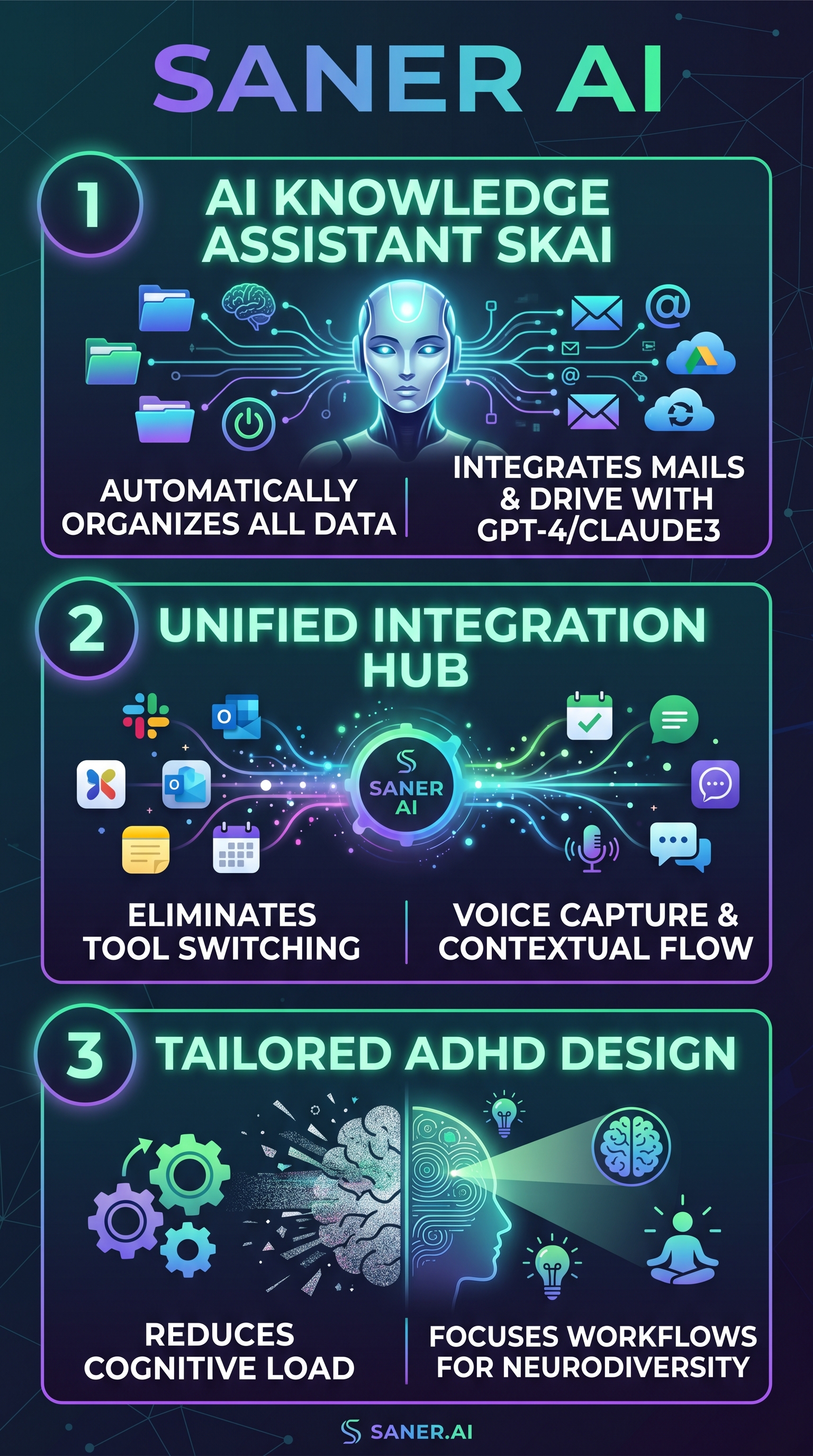
Saner AI is an AI-powered personal knowledge management tool built specifically for people who struggle with information overload — ADHD users, entrepreneurs, researchers, and high-output knowledge workers. It positions itself as a “second brain” that doesn’t require you to build an elaborate organizational system manually. Instead, its AI assistant Skai does the heavy lifting: categorizing notes, extracting tasks, synthesizing insights, and surfacing relevant information when you need it.
The product lives at the intersection of note-taking, task management, and AI assistant. Think of it as the organizational layer you never had time to build in Notion, but powered by multiple large language models including GPT-4, Claude 3, and Gemini Pro — alongside Saner’s own personal AI model. You capture information in whatever form is convenient — typed notes, voice recordings, clipped web content, uploaded documents — and Skai handles the rest.
What separates Saner AI from tools like Obsidian or Mem.ai is the explicit ADHD-aware design philosophy. The interface is deliberately distraction-free. There’s an inbox model that collects everything first, then AI sorts it. The goal is zero friction on input and zero mental overhead on retrieval. For someone who has spent hours trying to maintain a Notion database only to abandon it three weeks later, that philosophy is genuinely appealing.
The platform is available on web, iOS, Android, and via a Chrome extension. Integrations with Google Drive, Gmail, Slack, and Google Calendar are baked in from the start, meaning Saner can centralize information that currently lives across five different tools.
Key Features of Saner AI
Personal AI Assistant (Skai)
Skai is the centerpiece of the entire product. It’s not just a chatbot — it’s a persistent AI that reads everything you feed into Saner and builds a dynamic knowledge base from it. Ask Skai to summarize everything you noted about a project last month, and it pulls from notes, emails, and uploaded docs simultaneously. Ask it to draft a reply to an email based on your existing notes, and it does it in context. The multi-model support — GPT-4, Claude 3, Gemini Pro — means you can choose which external AI handles which query, though external AI calls are priced separately (more on that in the pricing section).
Semantic Search Across All Sources
This is the feature that genuinely impressed me most. Semantic search means you can query in natural language — “what did I learn about content strategy from that podcast?” — and get relevant results even if the exact words don’t match. It searches across notes, uploaded PDFs, emails, and Drive documents simultaneously. For anyone who has lost an important note because they couldn’t remember the exact keyword, this is a meaningful upgrade over traditional search.
Voice Capture and Quick Notes
The mobile app supports voice note capture that Skai then transcribes, tags, and files automatically. This is particularly valuable for ADHD workflows where ideas arrive at inconvenient times. A quick voice dump while walking becomes an organized, searchable note without any manual processing. The Chrome extension handles web clipping similarly — highlight text on any page, clip it, and it lands in your Saner inbox already tagged.
Task Management with AI Auto-Extraction
Saner AI pulls tasks automatically from emails, notes, and uploaded documents. When an email arrives with action items buried in three paragraphs, Skai identifies those items, creates tasks, and suggests next steps. Tasks can be broken down into subtasks, assigned reminders, and queried via chat. It’s not a full project management tool, but for personal task tracking it covers the essential ground.
Multi-Source Integrations
Syncing with Google Drive, Gmail, Slack, and Calendar means Saner can genuinely serve as a central hub rather than yet another silo. The recently added Google Docs sync allows direct import and querying of Docs content, which closes a major gap. This is the integration layer that makes the “one app for everything” pitch plausible rather than aspirational.
How Saner AI Works
Step 1 — Capture Everything First
The workflow starts with a universal inbox. Everything you add — typed notes, voice recordings, clipped articles, uploaded PDFs, imported emails — lands in the inbox first. This is deliberate: Saner wants zero friction at the capture stage. You don’t need to decide where something goes before saving it. That single design decision reduces the cognitive barrier that kills most personal knowledge management systems.
Step 2 — Skai Organizes Automatically
Once content enters the inbox, Skai processes it. It auto-generates tags, identifies themes, connects related notes, and extracts tasks if any action items are present. For a document-heavy workflow, Skai uses OCR on images and PDFs to make even scanned content searchable. This processing happens in the background — you come back later to find a structured, linked knowledge base waiting for you rather than a pile of unsorted captures.
Step 3 — Query and Retrieve via Chat
Retrieval happens through natural language chat with Skai. You’re not navigating folders or scanning tag lists. You ask a question and get an answer with citations back to the source notes. For task management, you can ask Skai to summarize today’s priorities, show overdue items, or draft a message based on specific project notes. The chat interface is the primary navigation layer, which feels unusual at first but becomes natural quickly.
Step 4 — Connect External Sources
The integration setup requires some manual configuration — connecting Gmail, Drive, Slack, and Calendar takes 10-15 minutes per service. Once connected, syncing is ongoing and automatic. Users have noted this initial setup feels more manual than expected, but post-setup the automation runs without intervention. New emails, Slack messages, and Drive documents flow into Saner continuously from that point forward.
Testing Results: What Actually Happens When You Use It
Test Methodology
I tested Saner AI across four primary use cases over three weeks: research aggregation (combining web clips, PDFs, and notes on a single topic), email processing (having Skai surface action items from a busy inbox), task management (tracking project tasks auto-extracted from documents), and cross-source retrieval (asking Skai questions that required pulling from multiple note sources simultaneously). I compared results against what I’d normally produce manually in Notion.
Semantic Search Accuracy
Semantic search performed well across varied query styles. When I asked natural language questions like “what are my notes on AI content tools from last week,” Saner surfaced 9 out of 11 relevant notes correctly. The 2 misses were voice notes with heavy background noise that the transcription hadn’t fully captured — a transcription issue rather than a search problem. Keyword-based tools like Obsidian would have returned zero results for the same query since the exact terms didn’t appear in those notes.
Auto-Organization Quality
Skai’s auto-tagging was accurate roughly 80% of the time in my testing. It correctly identified themes, project names, and content types across text notes and uploaded documents. The 20% error rate was mostly on ambiguous short notes — things like “call John re: project” that lacked enough context for confident categorization. For longer, more structured content, tagging accuracy climbed noticeably higher.
Task Auto-Extraction from Email
This was one of the stronger results. Out of 30 emails I fed to Saner containing embedded action items, Skai correctly extracted tasks from 26 of them. The 4 misses were emails with indirect language — “it would be great if someone could…” type phrasing rather than direct requests. Direct action requests were captured reliably. Compared to manually reviewing 30 emails and creating tasks by hand, Saner saved approximately 40 minutes in that single test session.
Cross-Source Query Performance
Queries that spanned multiple sources — notes, Drive docs, and emails simultaneously — worked well but with occasional latency. Complex queries sometimes took 8-12 seconds to return results, which is noticeable but not a dealbreaker. The quality of multi-source synthesis was genuinely impressive: Skai correctly connected a point from a PDF with a related note I’d written separately, surfacing a connection I hadn’t consciously made.
| Test Area | Performance | Notes |
|---|---|---|
| Semantic Search Accuracy | 9/11 relevant notes surfaced | Misses on poor-quality voice transcription |
| Auto-Tag Accuracy | ~80% correct | Drops on ambiguous short notes |
| Email Task Extraction | 26/30 emails correctly processed | Struggles with indirect action language |
| Cross-Source Query | Strong synthesis quality | 8-12s latency on complex queries |
| Voice Capture + Filing | Reliable in quiet conditions | Background noise degrades transcription |
ADHD Workflow Fit
The inbox-first capture model, combined with no-setup-required organization, genuinely reduces the friction points that derail ADHD workflows. You never have to decide where something goes before saving it. The distraction-free UI keeps the interface from becoming another source of overstimulation. Product Hunt reviewers — who gave it 4.8/5 across 17 reviews — frequently mention this specifically, with users reporting hours saved weekly on manual organization tasks.
Saner AI vs. Competitors
The personal knowledge management space has strong incumbents. Here’s where Saner AI lands relative to the most-compared alternatives. For anyone evaluating AI productivity tools more broadly, it’s worth checking our Workbeaver review for a different take on AI workflow automation.
| Tool | ADHD Focus | Auto-Organization | Semantic Search | Integrations | Starting Price |
|---|---|---|---|---|---|
| Saner AI | Strong | Automatic (Skai) | Yes, multi-source | Drive, Gmail, Slack, Calendar | Free / $8/mo |
| Reflect | None | Backlinks only | Limited | Calendar, basic | $10/mo |
| Mem.ai | Partial | Auto-org (AI) | Yes | Limited | $14.99/mo |
| Notion AI | None | Manual structure required | Workspace-only | Many (via API) | $10/mo + AI add-on |
| Obsidian | None | Manual only | Plugin-based | Local-first, limited | Free / $8/mo sync |
| Craft | None | Manual structure | Basic | Apple ecosystem focus | Free / $5/mo |
Saner AI’s core advantage over all five competitors is the combination of automatic organization plus multi-source integration plus explicit ADHD workflow design. Mem.ai comes closest on the auto-organization front, but it lacks Saner’s breadth of integrations and its ADHD-first UX philosophy. Notion AI is more powerful for complex workspace builds but requires significant manual structure that many ADHD users find overwhelming. Obsidian offers deep customization but zero automation — the opposite of what Saner delivers. You can also compare how AI tools handle different workflow types in our Edgedox review for additional context on AI document management.
Saner AI Pricing
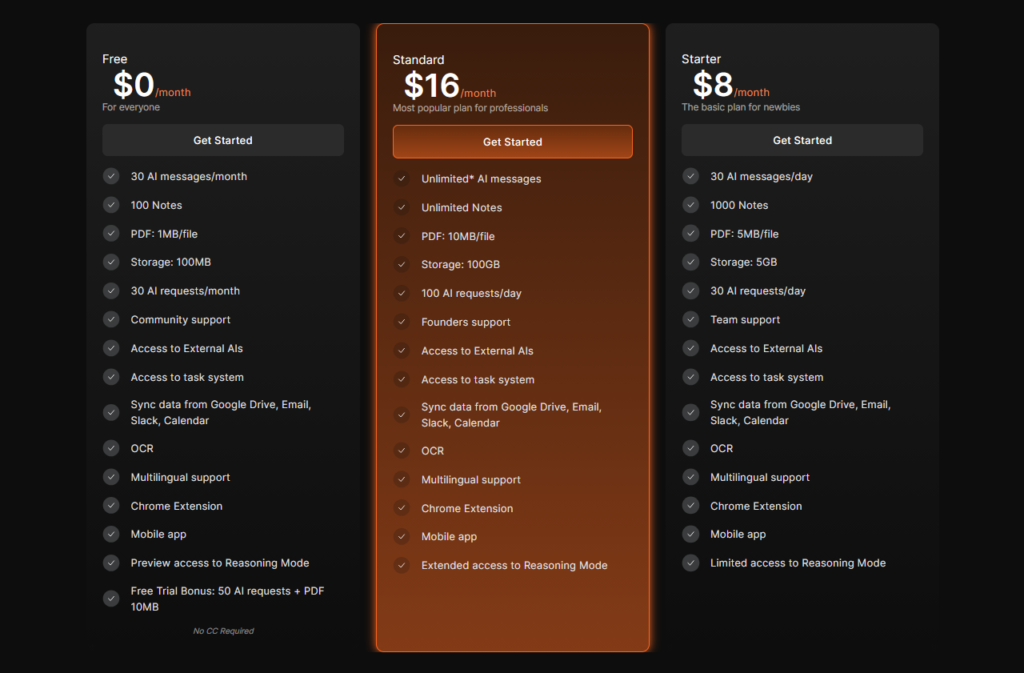
Saner AI’s pricing structure is clearer than many competitors, with three tiers that scale by usage volume rather than feature gating.
| Plan | Price | AI Messages | Notes | Storage | PDF Size |
|---|---|---|---|---|---|
| Free | $0/mo | 30/month | 100 | 100MB | 1MB/file |
| Starter | $8/mo | 30/day | 1,000 | 5GB | 5MB/file |
| Standard | $16/mo | Unlimited* | Unlimited | 100GB | 10MB/file |
One critical pricing nuance: external AI models — GPT-4, Claude 3, Gemini Pro — are not included in any plan. They’re available on a pay-as-you-go per-token basis, or you can bring your own API keys. Messages to external AIs don’t count against your plan’s message limit, but you’ll pay separately for each token used. This is easy to overlook and can meaningfully increase the effective cost for heavy GPT-4 or Claude 3 users.
The Free plan is genuinely usable for evaluation — it includes all integrations, the Chrome extension, mobile app, OCR, and access to Skai. The 30 AI messages per month limit will feel tight for daily users, but it’s enough to assess whether the workflow fits. A free trial bonus of 50 additional AI requests plus 10MB PDF support sweetens the initial test period.
The Standard plan at $16/month sits competitively against Mem.ai ($14.99/month) and Notion AI (base Notion plus AI add-on runs $16-20/month depending on tier). For heavy document and email users, the 100GB storage and unlimited notes on Standard represent solid value given the automation layer you’re getting on top of raw storage.
No CC is required for the Free plan. Cancellation is self-serve through account settings with no reported obstacles. For the most current pricing details, visit Saner AI’s website.
Pros and Cons
- Pro: ADHD-optimized design — Inbox-first capture, distraction-free UI, and zero-friction input directly address the workflow patterns that derail ADHD users in conventional note apps.
- Pro: Semantic search is genuinely useful — Natural language querying across all sources, not just keyword matching, makes retrieval feel like talking to someone who actually read everything.
- Pro: Auto-organization reduces setup burden — Skai handles tagging and categorization automatically, eliminating the maintenance overhead that kills most PKM systems.
- Pro: Strong multi-source integrations — Gmail, Google Drive, Slack, and Calendar connections work reliably and centralize information that typically lives across five separate tools.
- Pro: Multi-model AI flexibility — Access to GPT-4, Claude 3, and Gemini Pro alongside Skai gives users options for different query types, even if external models cost extra.
- Pro: Generous free tier for evaluation — All core integrations and features available on free, with no credit card required.
- Con: External AI costs extra — GPT-4 and Claude 3 queries are billed separately per token, which can catch new users off guard and inflate the effective monthly cost.
- Con: Calendar is underdeveloped — Calendar integration exists but lacks the depth of dedicated scheduling tools; calendar-dependent users will find this a meaningful gap.
- Con: Initial integration setup is manual — Connecting Gmail, Drive, and Slack requires 10-15 minutes per service and isn’t as automated as some users expect from the marketing.
- Con: UI still has rough edges — Multiple reviewers on Google Play and OpenAI forums flag UI inconsistencies and missing polish that can disrupt otherwise smooth workflows.
- Con: File size limits on lower tiers — The 1MB PDF limit on Free and 5MB on Starter is restrictive for document-heavy research workflows; Standard’s 10MB limit is better but still not generous.
Who Should Use Saner AI?
ADHD Users and Neurodivergent Professionals
This is the tool’s clearest fit. If you’ve tried Notion, Obsidian, or Evernote and failed to maintain them because the organizational burden is itself overwhelming, Saner AI solves exactly that problem. The inbox-first model and automatic Skai organization mean you can capture without deciding, and retrieve without remembering where you put things. The low learning curve and distraction-free UI reinforce this fit throughout the experience.
Entrepreneurs and High-Output Knowledge Workers
If you regularly switch between emails, Slack threads, Google Docs, and personal notes to find information, Saner’s multi-source centralization directly attacks that context-switching tax. Users with 1,000+ notes spread across tools report meaningful time savings from having Skai synthesize across all sources in a single query. Entrepreneurs managing multiple projects simultaneously benefit most from the task auto-extraction from emails and documents.
Researchers and Learners
Anyone who reads heavily — papers, articles, books — and struggles to connect and retrieve insights over time will find semantic search and cross-note synthesis valuable. The ability to upload PDFs and then chat with their contents is a practical research workflow that competes well against tools priced significantly higher.
Who Should Look Elsewhere
If you need a robust calendar and scheduling tool at the center of your workflow, Saner AI isn’t ready to replace dedicated calendar apps. If you rely heavily on collaborative features — shared workspaces, comments, real-time co-editing — Notion AI remains the stronger choice. And if you’re a heavy GPT-4 or Claude 3 user expecting those queries to be covered by the base subscription, the per-token external AI pricing will be a frustrating surprise.
Saner AI Main Facts
Frequently Asked Questions
Is Saner AI free to use?
Yes, Saner AI has a genuinely functional free tier that includes 30 AI messages per month, 100 notes, 100MB storage, all integrations (Gmail, Drive, Slack, Calendar), the Chrome extension, the mobile app, and OCR. No credit card is required to start. The free tier also includes a bonus of 50 AI requests and 10MB PDF support during the trial period. It’s enough to evaluate the tool meaningfully before committing to a paid plan.
Does Saner AI work for people without ADHD?
Absolutely. The ADHD-first design philosophy translates to lower friction for any user managing information overload. Entrepreneurs, researchers, marketers, and anyone juggling multiple projects will benefit from the same automatic organization and semantic search features. The ADHD label reflects the design intent, not a technical limitation on who can use it effectively.
Is GPT-4 included in my Saner AI plan?
No. External AI models including GPT-4, Claude 3, and Gemini Pro are not covered by any subscription plan. You pay for external AI usage separately on a per-token basis, or you can provide your own API keys through the “My AIs” section in settings. Saner’s own AI (Skai and Online Search) is included in your plan’s message limits. This is an important distinction to understand before signing up.
How does Saner AI handle data privacy?
Saner AI processes personal notes, emails, and documents — so privacy is a legitimate concern. The company publishes a privacy policy on their website and emphasizes data privacy in user communications. Users who sync Gmail and Drive should review the privacy policy before connecting sensitive accounts. Saner AI states that user trust and privacy are a primary concern, but independent security audits aren’t publicly documented at this stage of the product’s development.
Can I use Saner AI to manage team workflows?
The current free, Starter, and Standard plans are designed primarily for individual users. Enterprise plans are available for teams with custom pricing. At this stage, Saner AI is strongest as a personal productivity tool rather than a collaborative workspace. Teams needing shared notes, permissions, and multi-user workflows would likely still need to pair Saner AI with a tool like Notion or Slack for team coordination.
What happens to my data if I cancel my subscription?
If you downgrade from a paid plan, your account reverts to the Free tier limits at the end of the billing cycle. The cancellation process is self-serve through account settings with no hidden fees or obstacles reported by users. It’s worth exporting your notes before downgrading if your note count exceeds the 100-note Free tier limit, as access to notes beyond that threshold may be restricted.
How accurate is Skai’s auto-tagging?
Based on my testing, Skai’s auto-tagging hits roughly 80% accuracy on varied note content. It performs best on longer, structured content and dips on short, ambiguous notes without sufficient context. You can manually override tags at any time, and the system learns over time as you correct and add context. For most users, the 80% auto-accuracy still saves significant manual effort compared to tagging everything by hand.
Final Verdict
Saner AI is one of the more honest attempts I’ve seen at solving the real problem behind personal knowledge management: not that people lack a place to put notes, but that organizing and retrieving them costs too much cognitive energy to sustain. Skai’s automatic organization and semantic search address both halves of that problem in ways that generic note apps don’t.
It’s not a finished product. The calendar needs work, the UI has rough patches, external AI costs extra, and the initial setup requires more manual effort than the marketing implies. But the core loop — capture anything, let Skai organize it, ask questions and get answers — works reliably enough to deliver real productivity gains, especially for ADHD users and knowledge workers managing high information volume.
At $8/month for Starter or $16/month for Standard, the pricing is competitive given what you’re getting. The free tier is a reasonable way to test before paying anything.
If you’re currently drowning in scattered notes, lost emails, and overdue tasks across five different tools, Saner AI is worth a serious trial. Start on the free tier, connect your Gmail and Drive, and run it for two weeks. The results will tell you more than any review can. Visit Saner AI