Disclosure: Some of the links on Daily Digital Reviews are affiliate links. This means that if you click on a link and make a purchase, we may earn a small commission — at no extra cost to you.
A Book Creation Tool That Claims to Do It All
AIWriteBook is an AI book writing tool that pitches something most authors actually want: one platform that takes you from raw idea to published book without jumping between five different apps. That’s a big claim. So I looked at the vendor’s site, the pricing page, and the testimonials available to figure out what’s real and what’s just marketing copy.
The honest answer is somewhere in the middle. The feature set is genuinely broad and the pricing is clear and reasonable.
Quick Verdict: AIWriteBook covers more of the book creation process than most AI writing tools — from outline to audiobook to KDP metadata — all in one place. The pricing is accessible and the feature list is credible, but independent review data is limited, so take the vendor’s performance claims with appropriate caution.
Overall Rating: 4 / 5 ⭐
Feature depth: 4/5 · Ease of use: 4/5 · Pricing value: 4/5 · Trust signals: 4/5
What Is AIWriteBook?
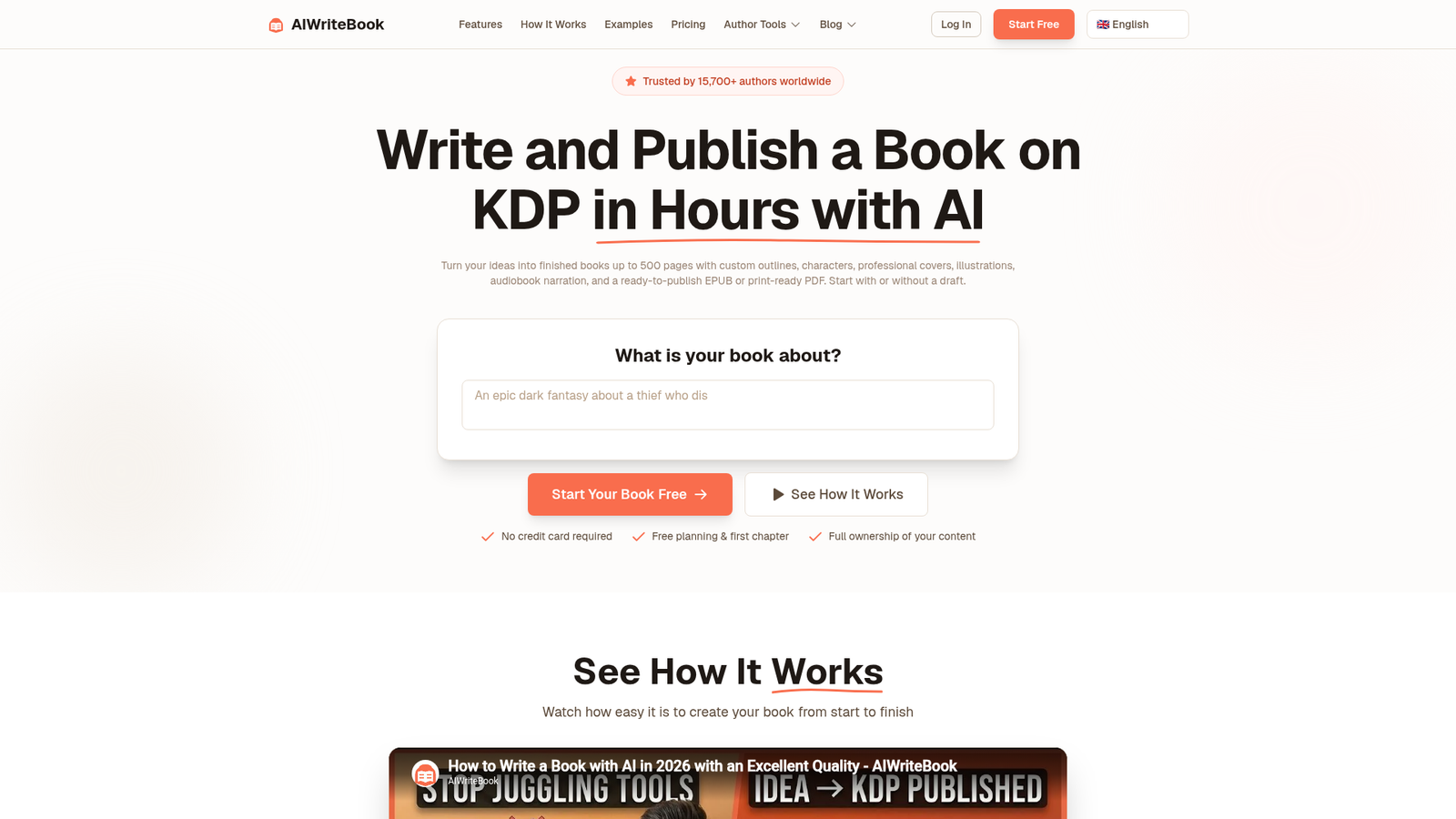
AIWriteBook is an end-to-end book creation platform aimed at solo authors and self-publishers. You start with a concept or an existing draft, and the tool walks you through outlining, chapter writing, cover design, audiobook conversion, and Amazon KDP metadata — all without leaving the platform. It supports both fiction and nonfiction, and it claims to adapt to your writing style when you upload previous work. The company says over 10,000 authors have used it and that more than 50,000 books have been generated on the platform.
Key Features
Outline and Chapter Generation
The platform builds structured outlines for both fiction and nonfiction. Fiction outlines include characters, plot arcs, and settings. Nonfiction outlines can include chapter structure, exercises, and key takeaways. From the outline, the tool expands each chapter using an AI writing engine. Users can edit any paragraph, regenerate weak sections, and adjust the output as they go. That’s a more interactive workflow than tools that just dump a full draft at you.
Style Adaptation
This is one of the more interesting features. The site says you can upload your own prior writing and the system uses it to condition the output — so generated chapters sound more like you and less like generic AI text. That matters a lot if you’re worried about voice consistency across a long book. The exact technical method isn’t disclosed, but the workflow description points to some form of style conditioning based on your uploaded text.
Publishing Pipeline
Beyond writing, AIWriteBook covers covers (AI-generated), audiobook conversion, KDP metadata including keywords and blurbs, and export to PDF, EPUB, and DOCX. The Ultra plan also includes book translation into 30+ languages and access to the NanoReads distribution network, which the platform says reaches 103,000+ built-in readers. That’s a real differentiator for authors who want to go beyond just writing the book.
How AIWriteBook Works
Step 1 — Input Your Idea or Upload a Draft
You either describe your book concept in text or upload an existing manuscript, notes, or partial draft. Supported formats include DOC, DOCX, PDF, EPUB, RTF, TXT, and MD. The platform picks up from wherever you are in the process.
Step 2 — Build the Outline
The system generates a detailed chapter-by-chapter outline based on your input. For fiction, this includes characters and plot points. For nonfiction, it maps the structure and major content blocks per chapter.
Step 3 — Write Chapters
Each chapter is generated by expanding its outline section. The style adaptation feature influences this step if you’ve uploaded prior writing. You can regenerate or edit any section you’re not happy with.
Step 4 — Publish and Export
Once the manuscript is done, you can generate a cover, convert to audiobook, set up KDP metadata, and export in your preferred format. Everything flows from the same dashboard without needing separate tools.
What the Evidence Shows
What the Vendor Claims
The site pitches AIWriteBook as a replacement for five to seven separate tools. It emphasizes speed (“complete books in hours”), style customization, and an end-to-end workflow from idea to export. The pricing page highlights 50,000+ books generated, a 4.9/5 rating, and 20+ genres supported. These are vendor-stated figures and should be read as such.
What Users Report
The reviews available on the pricing page — pulled from Capterra, Trustpilot, Google, and TAAFT — are broadly positive. Common themes include appreciation for the all-in-one workflow, the ability to import existing drafts, and audiobook creation. One Google reviewer noted a specific limitation: unused credits don’t roll over at the end of the month, which is worth knowing before you commit to a monthly plan. Another user on TAAFT said the chapters actually connect to each other, which they found better than using Gemini and Claude separately. There are no large-scale independent aggregator scores available in the research data, so this feedback, while credible in tone, comes from curated testimonials on the vendor’s own site.
How It Stacks Up Against the Category
Most AI writing tools — Jasper, Writesonic — are built for short-form marketing content. Sudowrite and NovelAI focus specifically on fiction prose but don’t cover publishing outputs like covers or metadata. AIWriteBook is narrower than the general-purpose tools and broader than the fiction-only tools. If your goal is a publishable book rather than better blog posts, it fits more naturally than anything in either of those camps.
AIWriteBook vs Competitors
For context, here’s how AIWriteBook’s documented feature set compares to alternatives. You can also check out the Hyperblog review for a long-form AI content tool comparison, or the Kraflio review for another AI content workflow tool.
| Feature | AIWriteBook | Sudowrite | Jasper |
|---|---|---|---|
| Book-level outline builder | Yes | Partial (fiction focus) | No |
| Style adaptation from uploads | Yes | Yes | Partial |
| Audiobook conversion | Yes (Pro+) | No | No |
| KDP metadata builder | Yes | No | No |
| Cover generation | Yes | No | No |
| Starting price (monthly) | Free / $12/mo | ~$19/mo | ~$49/mo |
Pricing
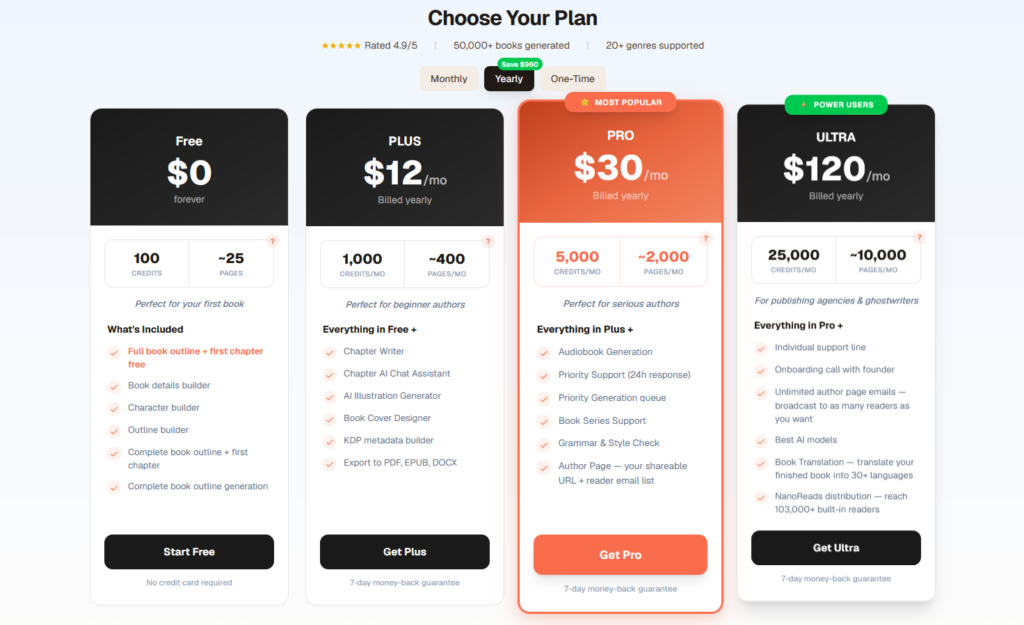
There are four plans. The Free plan is $0 and gives you 100 credits — enough for a full outline and your first chapter. The Plus plan is $12/month (billed yearly) and includes 1,000 credits per month, chapter writing, cover design, and export to PDF, EPUB, and DOCX. The Pro plan is $30/month (yearly) and adds audiobook generation, grammar and style check, book series support, and priority support. The Ultra plan is $120/month (yearly) and is aimed at agencies and ghostwriters — it adds book translation into 30+ languages and NanoReads distribution. All paid plans include a 7-day money-back guarantee. One thing to note: unused credits don’t roll over, as flagged by a user in the reviews. Click on the link for AIWriteBook pricing.
Pros and Cons
Pros
- Covers the full book creation pipeline — outline, chapters, cover, audiobook, KDP metadata — in one tool
- Free plan lets you test the core workflow before paying anything
- Style adaptation using your own uploaded writing is a genuine differentiator
- Supports both fiction and nonfiction with genre-aware structure
- 7-day money-back guarantee on all paid plans
Cons
- Unused credits don’t roll over — use them or lose them each month
- Independent review volume is low outside of vendor-curated testimonials
- Audiobook generation and the best AI models are locked to higher-tier plans
Who Should Use AIWriteBook?
If you’re a solo author or self-publisher who wants to go from idea to KDP-ready book without managing five different subscriptions, this tool makes sense. It’s also a reasonable fit for people who already have a partial draft and want to finish and package it — the import feature handles most common file formats. Writers working on a book series will benefit from the dedicated series support on the Pro plan.
It’s probably not the right fit if you’re a literary fiction writer who wants deep, nuanced prose assistance — Sudowrite is built more specifically for that. Agencies doing high-volume ghostwriting should look at the Ultra plan specifically, since the lower tiers cap out quickly on credit volume.
Frequently Asked Questions
Is AIWriteBook really free to start?
Yes. The Free plan requires no credit card and gives you 100 credits — enough to generate a full book outline and your first chapter. It’s a genuine free tier, not just a trial countdown.
Do I own the books I create with AIWriteBook?
The pricing page states 100% content ownership. You retain rights to whatever you produce on the platform.
What happens if I run out of credits mid-book?
You can upgrade your plan or wait for the next billing cycle. Unused credits from the previous month don’t carry over, so plan your usage accordingly.
Does AIWriteBook work for nonfiction as well as fiction?
Yes. The platform explicitly supports both. Nonfiction outlines include chapter structure, exercises, and key takeaways, while fiction outlines cover characters, plot arcs, and settings.
Final Verdict
AIWriteBook is one of the more complete AI tools I’ve analyzed for authors. The feature set — from outline to audiobook to KDP metadata — is broader than almost anything in its price range. The free entry point is generous, and the $12/month Plus plan is genuinely accessible for a first-time self-publisher. The main honest caveat is that independent review data is limited, so you’re partly taking the vendor’s word on output quality. The 7-day money-back guarantee softens that risk. If you’re serious about self-publishing and tired of juggling separate tools, it’s worth trying the free plan first. Visit AIWriteBook’s official site to get started.
Review Methodology
This review is based on analysis of the vendor’s documentation, pricing pages, and feature set, combined with user reports gathered from Capterra, Trustpilot, Google Reviews, and TAAFT as found in the available research data.