

Disclosure: Some of the links on Daily Digital Reviews are affiliate links. This means that if you click on a link and make a purchase, we may earn a small commission — at no extra cost to you.
AI Copilots That Actually Do Things — Or Just Another Chatbot?
The OnPilot review landscape is thin right now, which is exactly why it’s worth a closer look. Most AI tools claim they’ll save you hours. Most of them just generate text you still have to act on yourself. OnPilot pitches something different: an AI copilot that doesn’t just suggest — it executes. That’s a bold claim in a market full of bold claims, so let’s look at what the evidence actually supports.
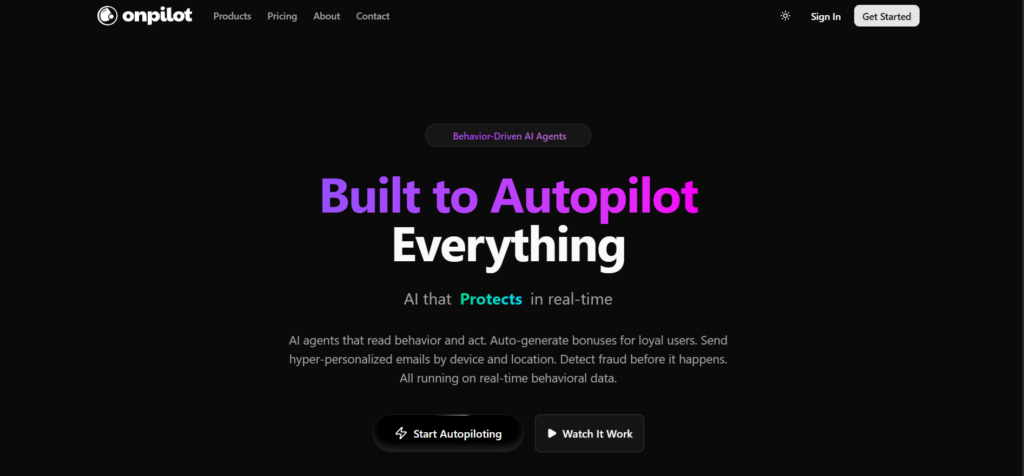
Quick Verdict: OnPilot looks like a genuine operational automation platform — not a content tool — with a behavioral AI layer and usage-based pricing starting at $99/month. The core idea is solid, but limited public reviews make it hard to validate reliability or integration depth independently. Worth a demo if you need cross-tool automation; proceed with pilot testing before full commitment.
Overall Rating: 3.3 / 5 ⭐
Feature depth: 4/5 · Ease of use: 3/5 · Pricing value: 3.0/5 · Trust signals: 3/5
What Is OnPilot?
OnPilot is an AI-powered copilot platform built for workflow automation and task execution across connected business tools. It’s not a chatbot, and it’s not a writing assistant. The focus is operational: connecting to your existing apps, reading user intent, and taking action inside those systems.
Their positioning targets teams that live inside tools like Slack and want to trigger real business actions without switching apps. They describe it as behavioral AI — the platform tracks events, interprets requests, and uses AI agents to carry out tasks across integrations. Their pricing page references 500+ companies and 50M+ events processed daily, which suggests it’s past the early prototype stage.
From a category standpoint, OnPilot sits closer to workflow automation tools than to AI content platforms. It competes with names like Zapier, n8n, Bardeen, Relay.app, and Workato — all tools that sit in the automation layer between your apps and your team.
Key Features
AI Agents with Behavioral Tracking
OnPilot’s core product is built around AI agents that respond to behavioral data — tracked events that tell the system what’s happening across your connected tools. On the Launch plan you get 5 agents and 100K tracked events per month. The Scale plan jumps to 25 agents and 1M events, and adds agent orchestration for more complex multi-step workflows. This isn’t just “run a zap when X happens” — the agents are described as capable of making decisions based on real-time behavioral signals.
Custom Agent Builder
The Scale and Enterprise tiers include a custom agent builder, which lets teams define their own automated behaviors beyond the pre-built templates. Pre-built templates are available on the entry-level plan, which should help with onboarding for standard use cases. How far you can push custom logic without needing developer help isn’t fully clear from public documentation.
Fraud Detection
This one’s interesting and worth flagging — it’s not a typical feature you’d expect from a workflow copilot. OnPilot lists both basic fraud detection (Launch) and advanced fraud detection plus custom fraud models (Scale/Enterprise). This suggests the platform has use cases beyond internal productivity, possibly covering customer-facing flows where suspicious behavior needs to be caught automatically.
Dynamic Reward Engine
The Scale plan includes a dynamic reward engine, which points toward user engagement or loyalty automation use cases. Again, this goes beyond simple task automation and hints at a product that’s doing more sophisticated behavioral work than the “AI copilot for Slack” framing might suggest.
Enterprise Controls
At the top tier, OnPilot offers on-premise deployment, dedicated ML training, custom fraud models, a SLA guarantee, and a dedicated success team. That’s a real enterprise package. Whether those capabilities are mature is harder to verify without direct customer reports.
How OnPilot Works
Step 1: Connect Your Tools
Based on vendor documentation, the process starts with connecting OnPilot to your existing business applications through integrations. The platform is built around API-level connections to third-party tools, including collaboration platforms like Slack.
Step 2: Track Behavioral Events
Once connected, OnPilot monitors behavioral events — actions users or systems take across connected tools. This event stream is the raw material the AI agents use to understand context and trigger responses. The event caps by plan (100K/month on Launch, 1M on Scale) determine how much activity the system can track and act on.
Step 3: Agents Interpret and Execute
When a triggering condition is met — either from a user request or a behavioral signal — the AI agents map the intent to available actions and execute through connected APIs. The orchestration layer manages multi-step flows, dependencies, and sequencing. The result, if it works as described, is that a user can issue a natural-language instruction and the system handles the rest inside connected tools.
Step 4: Review and Refine
Any serious automation platform needs a feedback loop. OnPilot’s documentation hints at monitoring and refinement capability, though the specifics of how users review agent actions or handle errors isn’t detailed in publicly available material. This is a gap worth probing in any sales conversation.
What the Evidence Shows
What the Vendor Claims
OnPilot describes itself as behavioral AI for automation, emphasizing execution over suggestion. They claim 500+ companies, 50M+ events processed daily, and 99.9% uptime — figures listed on their pricing page. Their tagline “Pay for Intelligence, Not Seats” signals a usage-based model they believe is fairer for buyers who don’t want to pay per head. They frame their differentiation as AI that acts on behavioral data, which goes beyond simple if-then rule automation.
What Users Report
Public review data for OnPilot is limited. Third-party directory pages track it, but the available research didn’t surface a large body of end-user reviews from platforms like G2, Capterra, or Trustpilot. This isn’t unusual for a newer or sales-led product, but it does mean there’s no strong independent signal on reliability, ease of setup, or real-world automation quality. In similar automation tools, common complaints tend to center on brittle integrations, setup complexity, and edge-case failures. Common praise focuses on time savings and reduced context switching. It’s reasonable to expect OnPilot to follow those patterns, but that’s an analytical inference — not confirmed user data.
How It Stacks Up Against the Category
Compared to category norms, OnPilot’s behavioral event tracking and fraud detection features are unusual additions that push it beyond basic workflow automation. Most Zapier-style tools don’t include fraud detection or dynamic reward logic. That either means OnPilot is targeting a more specific use case than the general copilot framing implies, or it’s trying to serve a broader operational surface. Either way, the feature set looks more substantial than a simple integration wrapper — but the lack of public user validation is a genuine gap versus more established alternatives like data automation tools with years of customer reviews.
OnPilot vs Competitors
| Feature | OnPilot | Zapier | Bardeen | n8n |
|---|---|---|---|---|
| AI Agents | Yes (5–Unlimited) | Partial (Copilot add-on) | Yes | Partial (via nodes) |
| Behavioral Event Tracking | Yes | No | No | No |
| Fraud Detection | Yes | No | No | No |
| Self-Hosted Option | Enterprise only | No | No | Yes |
| Free Trial | 14 days | Free tier available | Free tier available | Free (self-hosted) |
| Starting Price | $99/month | ~$20/month | Free / ~$10/month | Free (self-hosted) |
Competitor pricing sourced from publicly listed rates. Features based on available documentation and vendor claims as of 2026.
Pricing
OnPilot uses usage-based pricing with three tiers. The Launch plan is $99/month and includes 5 AI agents, 100K tracked events per month, pre-built agent templates, basic fraud detection, and email support. That’s the entry point for startups and small teams.
The Scale plan runs $399/month and targets growing companies and agencies. It includes 25 agents, 1M events per month, agent orchestration, a custom agent builder, advanced fraud detection, a dynamic reward engine, and priority support.
Enterprise is custom-priced with unlimited agents and events, on-premise deployment, dedicated ML training, and a dedicated success team.
All plans include a 14-day free trial with no credit card required, and the pricing page states you can cancel anytime. The $99 entry price is on the higher end compared to general-purpose automation tools, but the behavioral tracking and fraud features go beyond what most no-code automation tools offer at that price. Visit OnPilot’s official site for current plan details.
Pros and Cons
Pros
- Usage-based pricing is fairer for smaller teams — you’re not paying per seat, so costs scale with actual usage rather than headcount.
- Behavioral event tracking is a real differentiator — most automation tools react to triggers, not behavioral patterns. This opens up more intelligent, context-aware automation.
- Fraud detection built in — unusual for this category and useful for teams with customer-facing flows that need abuse prevention.
- 14-day free trial, no credit card required — low barrier to test before committing, which reduces risk for small teams.
- Enterprise-grade controls available — on-premise deployment and custom ML models are genuinely useful for regulated industries.
Cons
- Limited independent reviews — there’s not enough public feedback to confidently assess real-world reliability or integration quality.
- $99/month entry price is steep — compared to Zapier or Bardeen, the cost to start is high, especially if your use case is straightforward automation.
- Unclear integration depth — the breadth of supported tools and how well edge cases are handled isn’t clear from public documentation.
Who Should Use OnPilot?
Operations teams at growing companies who need to automate cross-tool coordination and are currently doing too much manual work to move data between systems will find the agent-based approach compelling.
Teams with customer-facing automation needs — especially those dealing with fraud risk, user behavior tracking, or reward/loyalty flows — will benefit from the features that go beyond typical workflow tools.
Agencies running automation on behalf of clients are a good fit for the Scale plan, where the agent count and orchestration features support more complex, multi-client workflows.
Solo operators or very small teams on a tight budget should probably look elsewhere first. The $99/month starting price is hard to justify when tools like Bardeen or n8n offer free tiers for basic automation. If you need something like lightweight workflow automation, start there. Likewise, if you just want AI-assisted content tasks, OnPilot is genuinely the wrong tool.
Frequently Asked Questions
What is OnPilot used for?
OnPilot is an AI copilot platform for workflow automation and task execution across connected business tools. It uses AI agents and behavioral event tracking to automate operational tasks, detect fraud, and manage cross-tool workflows — not to generate content or answer questions.
Does OnPilot have a free plan?
Based on the pricing page, there’s no permanent free plan. All paid plans include a 14-day free trial with no credit card required. You’ll need to sign up to access the trial.
How does OnPilot differ from Zapier?
Zapier is primarily a rule-based, trigger-action automation tool with a large integration library. OnPilot adds behavioral event tracking, AI agents that respond to patterns rather than just simple triggers, and built-in fraud detection — features that aren’t part of Zapier’s standard offering. OnPilot starts at $99/month versus Zapier’s lower entry pricing.
Is OnPilot suitable for enterprise use?
The Enterprise tier includes on-premise deployment, dedicated ML training, custom fraud models, and an SLA guarantee — features that point toward enterprise readiness. Whether the platform has the maturity and customer support infrastructure to match larger automation vendors isn’t fully verifiable from public information alone.
What integrations does OnPilot support?
Slack is specifically referenced in the product’s positioning. Beyond that, the full integration list isn’t detailed in publicly available documentation. This is a critical question to ask during any sales or demo conversation before committing to a plan.
Final Verdict
OnPilot is more interesting than a first glance suggests. The behavioral AI layer, fraud detection, and usage-based pricing put it in a different lane from basic no-code automation tools. If those features match your actual use case — event-driven automation, customer-facing workflows, or fraud-sensitive operations — it’s worth a serious look.
The concerns are real though. The $99/month starting price is a meaningful commitment when public review data is thin and integration coverage isn’t fully documented. Competitors like Zapier have massive ecosystems and years of customer validation. n8n is free if you self-host. Bardeen is accessible at much lower cost for simpler browser-based automation.
The smart move is to use the 14-day trial, run it against a real workflow, and test the specific integrations you need before paying. Don’t commit to the Scale plan until the Launch plan has proven reliable in your environment.
Review Methodology
This review is based on analysis of OnPilot’s official website, pricing page, and feature documentation, combined with user signals and category context gathered from third-party software directories and automation tool comparison sources. Where user review data was limited, that limitation is noted explicitly rather than filled with assumptions.