Disclosure: Some of the links on Daily Digital Reviews are affiliate links. This means that if you click on a link and make a purchase, we may earn a small commission — at no extra cost to you.
A Blogging Stack Problem Worth Solving
The Hyperblog review conversation is gaining traction for one simple reason: most bloggers are paying for five tools to do what one platform should handle. If you’re running a WordPress blog right now, you’re probably juggling hosting, an SEO plugin, a lead capture tool, a design tool, and maybe a CDN. That adds up fast — and it breaks in frustrating ways.
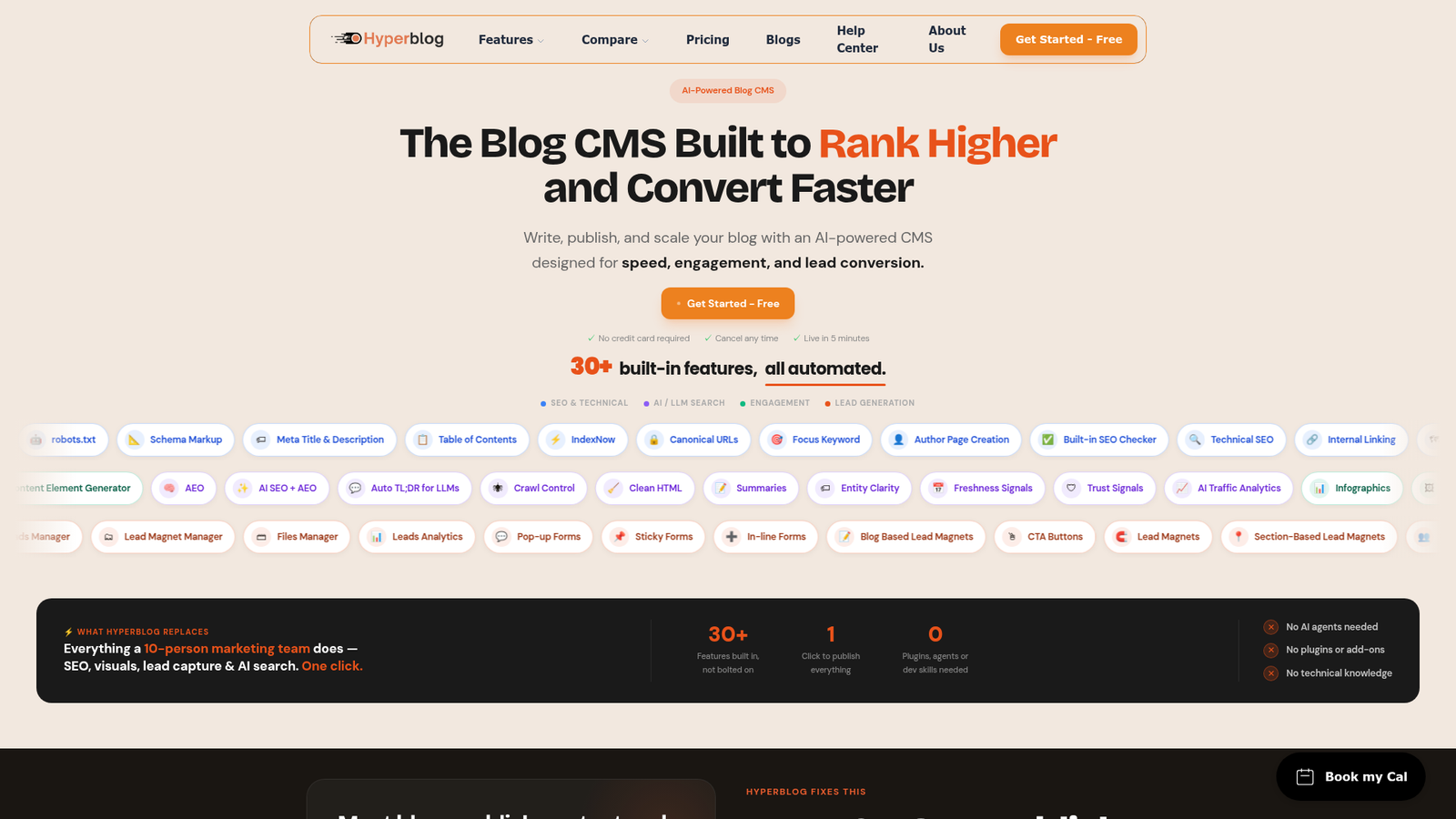
Hyperblog pitches itself as the fix. It’s an AI-enabled blogging platform that combines content creation, SEO, lead capture, and WordPress migration into one cloud-based system. As an analyst, I reviewed the vendor’s documentation, pricing pages, and available third-party listings to give you a straight read on whether this holds up.
Quick Verdict: Hyperblog is a genuinely interesting AI blogging platform with a free beta, a clear pricing structure, and a strong case for consolidation. The feature set is solid for solopreneurs and small teams. The main caveat is that it’s still in beta, so long-term reliability and review volume are thin.
Overall Rating: 3.5 / 5 ⭐
Feature depth: 4/5 · Ease of use: 3.5/5 · Pricing value: 4/5 · Trust signals: 2.5/5
What Is Hyperblog?
Hyperblog is a cloud-based AI blogging platform built for bloggers, content marketers, solopreneurs, and small B2B teams who want to publish and optimize content without managing a pile of separate tools. The company describes it as a complete blog operating system — not just a writing assistant, but a full publishing workflow that includes SEO automation, visual content generation, lead capture, and WordPress migration.
It’s currently in free beta, meaning all plans are available at no cost with no credit card required. After beta, it will move to a freemium model with paid plans starting at $29/month. The closest philosophical competitor is Ghost, though Hyperblog leans harder into AI and lead generation.
Key Features
AI Content Creation and Enhancement
Hyperblog includes AI-powered tools for drafting, outlining, and refining blog content. AI credits power every generated asset — banners, infographics, lead magnets, and polls. Credits reset monthly and don’t roll over. The Scale plan unlocks the most AI capability, including an AI Helper for outlines and intent suggestions for keyword targeting.
Always-On Technical SEO
Every plan, including the free tier, includes automatic technical SEO. That means meta tags, schema markup (all types), canonical URLs, Open Graph tags, and sitemap updates happen automatically on every published post. This is a real differentiator — most platforms gate SEO tools behind paid plans. Hyperblog’s pricing page explicitly states “SEO is never gated because ranking higher is our core promise.”
Lead Capture and Conversion
Hyperblog includes AI-generated lead magnets (PDFs, checklists), lead forms, and newsletter capture built directly into the publishing workflow. The free plan gives you two lead magnets and three forms. Paid plans scale up to unlimited. Importantly, existing lead magnets keep working even if you hit your monthly limit — the platform doesn’t shut off live assets when you exceed a cap.
WordPress Migration
Migration from WordPress (or any CMS) is available on all paid plans (Launch and above). According to the vendor’s documentation, users can bring their entire content library into Hyperblog without losing historical content or SEO value. The free plan does not include migration.
Team Collaboration and Integrations
The Grow plan adds five team members and collaborative post review. The Scale plan extends to 15 members and adds Zapier, n8n, MCP connections, API access, webhooks, and GDPR compliance tools — features aimed squarely at B2B content teams and agencies.
How Hyperblog Works
Content Creation Workflow
Based on the vendor’s documentation, users draft or import content into the platform, then apply AI tools to generate visuals, refine copy, or build lead magnets. The Scale plan also supports importing from Google Docs and Notion, which helps teams that already have established writing workflows.
Publishing and SEO Automation
Once content is ready, Hyperblog handles publishing with automatic technical SEO applied to every post. No plugin configuration needed. Schema markup, canonical tags, and sitemap updates happen in the background.
Migration Process
The migration feature ingests WordPress content and metadata, maps existing URLs, and aims to preserve SEO signals during the transition. The vendor claims this works across WordPress, Webflow, Framer, Next.js, and other platforms. Users can connect Hyperblog as a subfolder (yoursite.com/blog) or subdomain (blog.yoursite.com) without touching their existing site.
What the Evidence Shows
What the Vendor Claims
Hyperblog positions itself as a replacement for a fragmented five-tool stack that typically costs $105/month or more when you add up WordPress hosting, Yoast SEO Premium, OptinMonster, Canva Pro, and a CDN. Their Grow plan at $79/month (monthly billing) or $71/month (annual) is pitched as the all-in equivalent. The consolidation math is straightforward and, based on the pricing page, appears accurate for the tools they’re comparing against.
What Users Report
Public review volume is genuinely thin at this stage. Third-party directory listings describe Hyperblog as streamlined and AI-enabled, but there isn’t enough independently verified review data from platforms like G2, Capterra, or Trustpilot to draw broad conclusions. This is consistent with an early-stage beta product. The limited feedback that exists skews toward the convenience and consolidation angle — which matches what the vendor emphasizes.
How It Stacks Up Against the Category
Compared with Ghost, WordPress.com, and Webflow, Hyperblog’s built-in lead capture and AI credit system stand out. Most competing platforms require third-party integrations for lead magnets and form handling. The always-on technical SEO on the free plan is also stronger than what most platforms offer at zero cost. Where Hyperblog likely falls short is extensibility — WordPress’s plugin ecosystem is simply unmatched for advanced customization, and Webflow gives designers far more visual control.
Hyperblog vs Competitors
For more context on AI content tools, see our Krible AI review and our breakdown of Rankpilot for SEO-focused publishing workflows.
| Feature | Hyperblog | Ghost | WordPress.com |
|---|---|---|---|
| Free plan available | Yes (forever) | No | Yes |
| Built-in AI content tools | Yes | No | Partial |
| Built-in lead capture | Yes | Partial (memberships) | Via plugins |
| WordPress migration | Yes (paid plans) | Yes | Yes |
| Auto technical SEO (free) | Yes | No | Partial |
| Starting paid price | $29/month | ~$9/month | ~$4/month |
Pricing
Hyperblog is currently in free beta — all plans are free with no credit card required. After beta, the Free Forever plan stays at $0 and includes 20 posts/month, 100 AI credits, and full technical SEO. Paid plans are: Launch at $29/month, Grow at $79/month (or $71 billed annually), and Scale at $139/month (or $125 billed annually). Agency plans exist but require direct contact. Add-ons are available on paid plans, including extra AI credits starting at $7.50 for 400 credits. For current details, visit Hyperblog.
Pros and Cons
Pros
- Free beta access — all plans are free right now with no credit card needed
- Always-on technical SEO on every plan, including the free tier
- Built-in lead capture with AI-generated lead magnets, forms, and newsletter tools
- WordPress migration included on all paid plans with SEO preservation claims
- Honest consolidation math — the pricing page makes a clear, checkable case against the five-tool stack
Cons
- Beta-stage product — limited independent review volume means reliability is unproven at scale
- Less extensible than WordPress — no plugin ecosystem, limited code-level control
- Key features are plan-gated — Google Docs import, Zapier, API access, and GDPR tools only on Scale ($139/month)
Who Should Use Hyperblog?
Hyperblog makes the most sense for solopreneurs and content marketers who are tired of wiring tools together and want a single place to publish, optimize, and capture leads. If you’re on the free tier of multiple tools and paying $80–$100/month across them, the Grow plan is worth a serious look.
It’s also a fit for small B2B content teams who need collaborative review, team publishing, and lead tracking without a full-stack developer to manage it.
Bloggers migrating off WordPress who want to keep their SEO equity are a natural target — migration is included on all paid plans.
It’s probably not the right call for advanced WordPress users who rely on specific plugins or custom code. And if you’re a designer-first publisher, Webflow or Framer will give you more visual control. Developers who need API-first flexibility at a lower price point should also look elsewhere.
Frequently Asked Questions
Is Hyperblog really free right now?
Yes. Hyperblog is in free beta, and all plans are available at no charge with no credit card required. The company states beta access is limited to early users and that paid billing will activate after beta ends.
Does the free plan include SEO tools?
Yes. Auto Technical SEO — including meta tags, schema markup, canonical URLs, and sitemap updates — is available on all plans including the free tier. The pricing page explicitly states SEO is never gated.
Can I migrate from WordPress without losing rankings?
WordPress migration is available on all paid plans (Launch and above). The vendor claims it preserves historical content and SEO value, but since this is a beta product with limited public reviews, you should verify the specifics directly before committing a live site.
What happens if I run out of AI credits?
Existing AI-generated assets — banners, lead magnets, polls — keep working on your posts. You just can’t generate new ones until credits reset the following month. Credits reset monthly and don’t roll over.
Final Verdict
Hyperblog is a smart, well-structured platform that addresses a real problem. The all-in-one pitch is credible — the pricing page lays out an honest comparison, the free plan is genuinely useful, and the technical SEO automation on every tier is a meaningful advantage over most competitors.
The honest limitation is that it’s a beta product. There’s limited independent review data, and the migration and SEO preservation claims — while plausible — haven’t been stress-tested by a large user base yet. If you’re a solopreneur or small team looking to simplify your blogging stack, the free beta is a low-risk way to explore it. If you’re managing a high-traffic site where SEO stability is critical, tread carefully and validate the migration tooling before moving anything live.
For more AI content tools worth considering alongside this one, check our Ozor.ai review.
Review Methodology
This review is based on analysis of the vendor’s documentation, pricing pages, and feature set, combined with user reports and positioning data gathered from third-party software directories and available public listings. No hands-on testing was conducted.